
The service fields
An appointment service is a reusable class that has been opened for appointments. Its appointment fields live on the Appointment - Settings tab of the class editor:
| Field | What it means | Default / limits |
|---|---|---|
| Open for appointments | Makes the class bookable as an appointment service. | Turn it on in the Settings pill. |
| Class Size | How many attendees one instructor serves in one appointment. | Set on the class itself. |
| Time frame | How often start-time choices are generated — for example every 15 minutes. | See Set the time frame between appointment start times. |
| Buffer time - Open | Preparation time reserved before each appointment. | 0, 5, 10, 15, 20 or 30 minutes. |
| Buffer time - Close | Clean-up time reserved after each appointment. | 0, 5, 10, 15, 20 or 30 minutes. |
| Working Hours | The days and time slots on which this service can be booked. | An unticked day shows as a single Closed line. |
| Booking quantity | A fixed total number of places sold in one customer booking. | Choose None to let customers select the number of attendees; 1 fixes it at one, 2 requires two, and so on. |
| Booking cutoff | How close to the service start a customer may still submit a booking. | Follows Settings → Reservation → Reservation time unless the service keeps its own value under General → Reservation & Cancellation. |
Equipment hire items are hidden appointment-style services with no instructor; they use the same Time frame and buffer logic.
Step-by-step: create the service
- If the reusable class does not exist, go to Admin → Classes → New, set its Class Size and duration, and save.
- Go to Admin → Appointments → Classes and select that class. This table has no New button of its own — appointment services are created as classes.
- The editor opens on the Appointment - Settings tab (the others are Appointment - Special dates and General). In the Settings pill, turn on Open for appointments, then set the Time frame, Buffer time - Open and Buffer time - Close.
- Set Booking quantity when every booking must reserve a fixed number of attendees; choose None to let customers select their quantity.
- In Working Hours, tick each day you are open and add its time slots. Use Verify to preview the generated available times.
- Save, then open General → Reservation & Cancellation and keep the business reservation setting or turn it off for a service-specific cutoff.
After saving
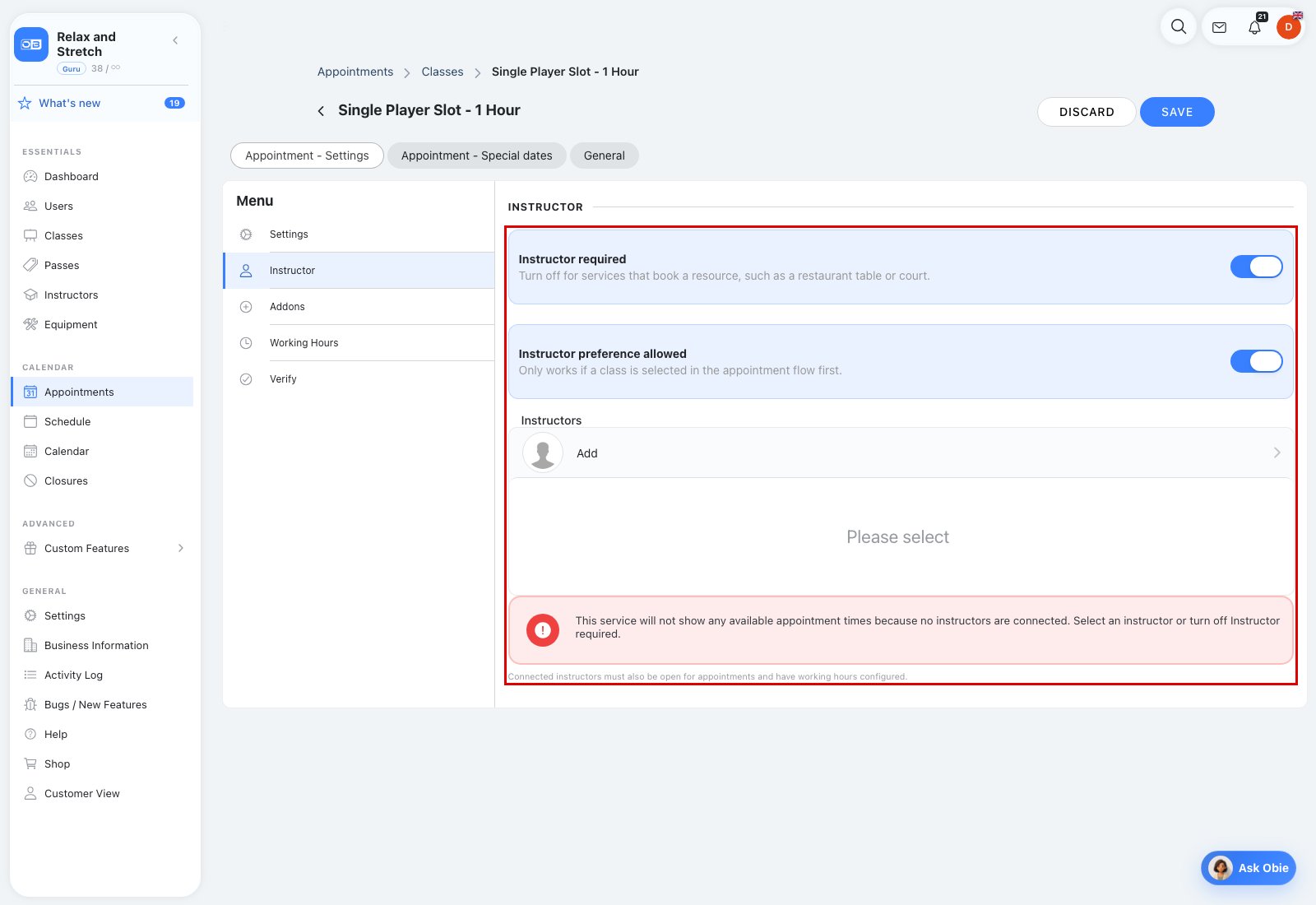
Open Appointment - Settings → Instructor to choose whether an instructor is required. If required, select the instructors who can deliver this service. A red alert appears when none are selected: the service will have no available slots. You can also manage the same connections in an instructor's Classes pill. When an instructor is not required, leave the toggle off. The service still needs to be open for appointments and have working hours.
Fixed-quantity examples (where Booking quantity is available):
| Class Size | Booking quantity | What one booking needs |
|---|---|---|
| 4 | 2 | One schedule and one instructor for two attendees. |
| 1 | 2 | Two simultaneous schedules and two available instructors. |
| 2 | 5 | Split into 2 + 2 + 1 — three simultaneous instructors. |
Other pills in the service editor
| Pill / tab | What it does | Notes |
|---|---|---|
| Addons | Shows the add-on items and add-on groups linked to this service, with an Addons picker and an Addon Groups picker. | Where available. Items, groups and add-on classes themselves are managed on the Appointments page's Addons tab — see Create and link appointment add-ons. |
| Instructor preference allowed | Lets customers state which instructor they prefer. | In the Instructor pill; shown when Instructor required is on. |
| Booking quantity | Fixes the number of places each booking reserves. | In the Settings pill. |
| Appointment - Special dates | Overrides or closes individual dates for this service without changing its weekly Working Hours. | — |
| General | The ordinary class settings — name, duration, price or pass, and Reservation & Cancellation. | — |
The admin AI assistant can create or update appointment services, connect instructors and change working hours for you.
