
What the booking flow is
The booking flow is the sequence of steps a customer goes through when booking an appointment. Three steps are available — Classes, Instructors and Date — and each is in one of three states.
| State | What the customer sees | Use it when |
|---|---|---|
| Disabled | The step does not appear at all. | Your business does not need the choice — a clinic that assigns the practitioner itself, for example. |
| Optional | The step is shown, but the customer can continue without picking anything. | A preference is nice to have but not essential, such as a favourite stylist. |
| Required | The customer must pick a value before moving on. | The appointment cannot be scheduled without that choice. |
Date is always required: an appointment must land on a specific date and time, so its Enabled and Required checkboxes are locked. Classes and Instructors can be disabled freely. Add-ons are not a step — customers choose them on the booking summary before confirming.
Choose the order
The default order is Classes → Instructors → Date: customers pick a class, then an instructor for that class, then a date. Different businesses prefer different starting points — classes-first suits customers who know what they want but are flexible on who provides it; instructor-first suits customers who come for a particular person.
| Business | Order | Why |
|---|---|---|
| Coaching studio | Instructors → Classes → Date | Customers pick their preferred coach first, then a service that coach offers. |
| Clinic | Classes → Date (Instructors disabled) | Customers choose a treatment and a time; the clinic assigns who performs it. |
| Salon | Classes → Instructors (optional) → Date | Customers choose a treatment and may pick a favourite stylist, or take whoever is free. |
Required steps must form a contiguous prefix: an optional step can never be followed by a required one.
The form enforces this for you. Marking a later step required makes every earlier step required too; disabling an earlier step turns the later steps optional.
How to configure
Go to Admin → Appointments → Settings. The Booking flow block shows one card per step.
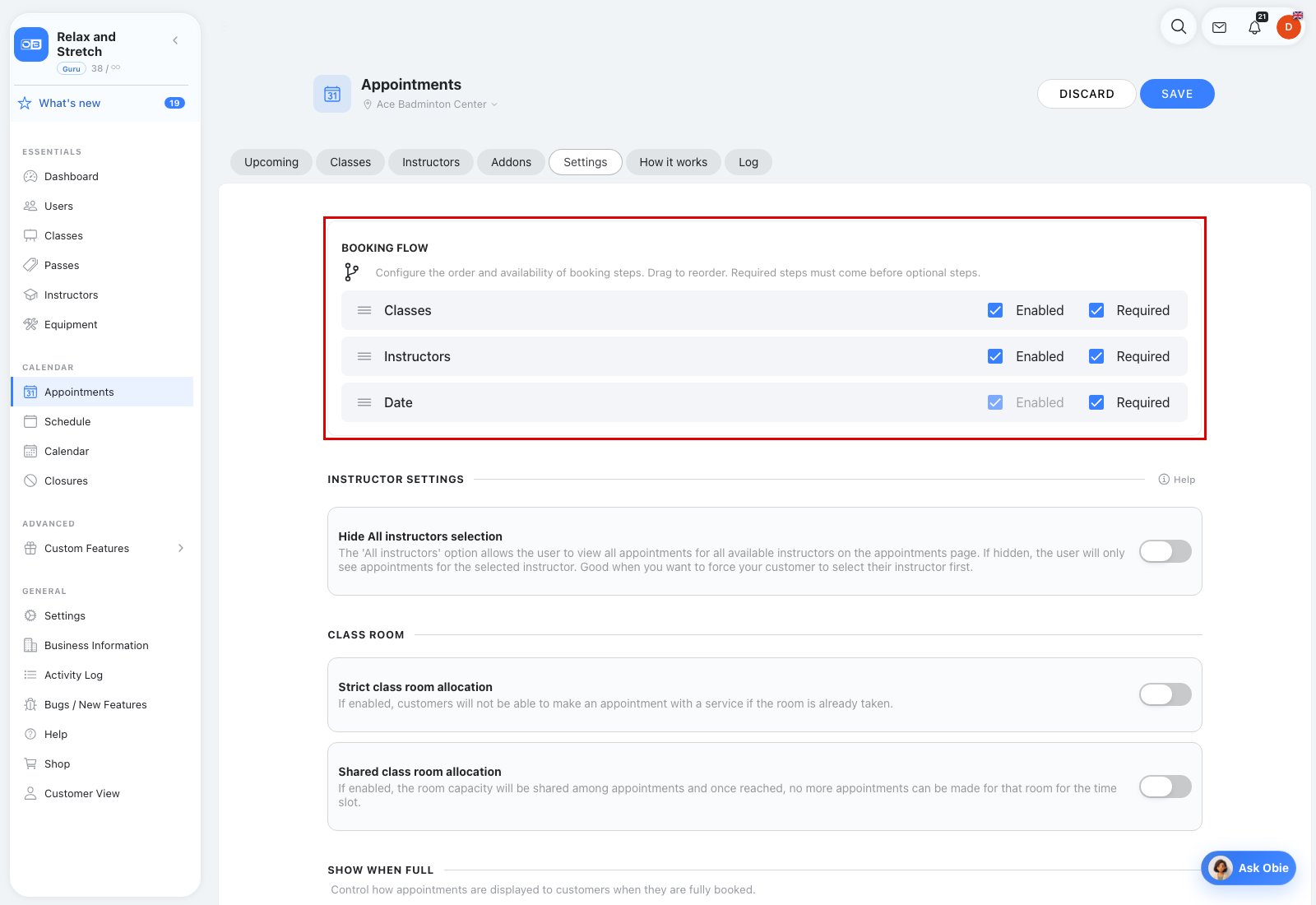
- Tick or untick Enabled on each card — off means the step is disabled.
- Tick Required to make an enabled step required; leave it unticked for optional. The form blocks invalid combinations.
- To reorder, drag a card up or down by the handle (≡) on its left. The form updates immediately and the customer URL structure follows the new order.
- Click Save.
Where the booking flow block lives, and Show when full
The Appointments page tabs are Upcoming · Classes · Instructors · Addons · Settings · How it works · Log. On the Settings tab the booking flow block sits at the top of the page. After the classroom settings there is also a Show when full setting, which controls whether fully booked appointment times are still shown to customers. With the Multiple Locations custom feature these settings can be kept per location — see Per-location Appointment settings.
