Can You Build Your Own Booking System With AI?

by Emily Zhang
· 11 min read
Back in January, a thread went round about building a working booking system in minutes using Google AI Studio. We wrote about the risks at the time.
Seven months on, things have changed — and mostly in the direction of "more feasible."
AI coding has moved fast this year. "Vibe coding" went from a novel phrase to something a lot of people are actually doing. You don't need to write code to have a credible-looking booking page by the end of an afternoon.
So this isn't another "don't do it" article. That would be dishonest, and it wouldn't help anyone who's seriously weighing it up.
The useful question is narrower: when does building your own make sense, and when doesn't it?
One disclosure up front: we sell a booking system. This article has a conflict of interest. So for every judgement below, we've tried to give you a reason you can check rather than asking you to take our word for it.
🌻 Four situations where building your own is the right call
Not every case needs commercial software.
You're collecting form responses, not handling money or personal data. Event sign-ups, trial class registration — a name and a contact, deleted when it's over. Google Forms covers this. You don't even need AI.
Your booking logic is genuinely simple. One person, one service, fixed slots, payment on arrival. No passes, no memberships, no multi-instructor scheduling. Most of a commercial system would go unused.
You're validating a business model that hasn't settled yet. You don't know what you're selling, at what price, to whom. Paying for software at this stage is premature — run it on the simplest thing that works and revisit once the model firms up.
You're a developer, or you have someone who can maintain it long-term. This is the decisive one. The cost of DIY isn't building it, it's keeping it working. If that capability already exists in-house, DIY can genuinely be cheaper and better-fitted.
If you're in one of those four, you can stop reading here. (Seriously.)
🌻 When it starts to go wrong
The risk climbs sharply as soon as any of these apply:
- You store personal data (names, phone numbers, emails, health information)
- You take payments online
- You sell prepaid products (class passes, stored value, term packages)
- You schedule multiple instructors or rooms
- Downtime costs you money — if clients can't book, that's lost revenue
Each additional item doesn't add complexity linearly. It moves you up a tier.
🌻 Three things AI won't warn you about
🔸 Security: AI writes code that works, not code that's safe
This was the core of our January article and it still holds — with one update. **Newer models are noticeably better on security.** If you explicitly ask for input validation, parameterised queries, and permission checks, you'll get them.
The problem is knowing what to ask for.
⚠️ SQL injection happens when database queries aren't parameterised — an attacker puts specially crafted text in an input field and pulls out your entire member table. Without a specific prompt, AI-generated code frequently has this.
⚠️ Incomplete permission checks are the most common DIY flaw: the button is hidden in the interface, but the server never verifies who's calling. Anyone who knows the URL can walk into the admin view. AI implements the flow you describe; it doesn't usually consider someone deliberately going around it.
⚠️ Unencrypted transport and storage — passwords stored in plain text, no forced HTTPS. Basic to anyone who knows, invisible to anyone who doesn't.
The point isn't that AI is dangerous. It's that you don't know what you don't know — and with security, everything looks fine right up until it doesn't.
🌻 Compliance: you're a business holding personal data
The moment your system stores a client's name and contact details, data protection obligations attach to you. That's true whether you built the system or bought it — the responsibility sits with you, not the tool.
Broadly, you'll need to: state what you're collecting data for, take appropriate security measures, honour requests to access, correct, or delete data, and notify people if there's a breach.
If your clients include minors, or your intake forms ask about injuries and health conditions — common in movement studios — that data sits in a more sensitive category with a higher bar.
🌻 Payments: money is a different tier
Taking card payments isn't "plug in an API."
In practice, small businesses shouldn't touch card numbers at all — redirect to the payment provider's hosted page so card data never reaches your server. That's the right approach, but you have to know to take it.
The most common DIY payment problem isn't security, though. It's reconciliation: payments that succeed while the callback fails so your system never records them; double charges; no refund flow, so everything's manual; a month-end where the numbers don't line up and you can't tell which transaction is which.
None of that makes the news. All of it costs you hours every month.
🌻 The hard part isn't the code — it's the business logic
An experienced developer can handle everything above. But there's one thing even a good developer takes a long time to discover: **how detailed the rules in this industry are.
❓ How do class passes deduct? A member books and doesn't show — does the class count? What if they cancel 24 hours out? Twelve? Same day? If a typhoon closes the studio, how many days does everyone get extended, and what happens to passes that already expired?
❓ How does the waitlist work? Class is full, A joins the waitlist. Someone cancels, A is notified. Three hours pass with no response — do you skip to B? What if A replies after being skipped? What if the class starts in two hours — notify at all?
❓ How is instructor pay calculated? The same instructor teaches group and one-to-one at different rates. When they're off, booked private sessions need rescheduling and group classes need cover. Whose hourly rate applies to the substitute?
These aren't features. They're a few hundred edge cases.
A large part of what commercial systems cost is exactly this — rules ground out across thousands of studios. What you build in an afternoon handles the normal path. Running a studio, most of your admin time goes on the abnormal ones.
We think this is the most underrated point in the whole discussion. You might be lucky and never face a security incident. You will face a pass dispute and a scheduling clash every single month.
🌻 Costs that show up three months later
The expensive part of DIY isn't launch day.
✔️ Maintenance. The AI service, payment API, and notification provider you depend on will all change. Something that runs fine today breaks next month because a spec shifted. You diagnose it; you fix it.
✔️ Changes. Business evolves, you want a new feature. You may not fully understand the code AI wrote, and changing one thing breaks three others. This is where most DIY projects quietly get abandoned.
✔️ Migration. If you ever move to a commercial system, can you export? In what format? Do pass balances, transaction history, and booking records come across intact? Nobody thinks about this while building, and everybody thinks about it while leaving.
✔️ Your time. The most overlooked cost. Every hour on system maintenance is an hour not spent teaching, selling, or serving clients.
A rough check: multiply the hours you expect to spend maintaining it each month by what your time is worth.** If that exceeds a subscription, DIY is the more expensive option.
🌻 If you're building anyway, do at least these five things
We're not trying to talk everyone out of it. If you've weighed it up and still want to build, treat these as the floor:
1. Don't store passwords yourself. Use third-party sign-in, or a mature auth service. Rolling your own password storage and reset flow goes wrong often.
2. Never let card numbers touch your server. Redirect to the payment provider's hosted page. This one isn't negotiable.
3. Back up daily — and test a restore. An untested backup isn't a backup. Restore it manually at least once.
4. Write a privacy policy and disclose what you collect. This is a requirement, not an optional extra.
5. Plan your exit first. Confirm your data exports to a standard format. That step will save you later.
If reading that list made you think "this sounds like a fair amount of work" — that reaction is the point.
🌻 A simple way to decide
Rather than asking whether an AI-built system can work, ask these three:
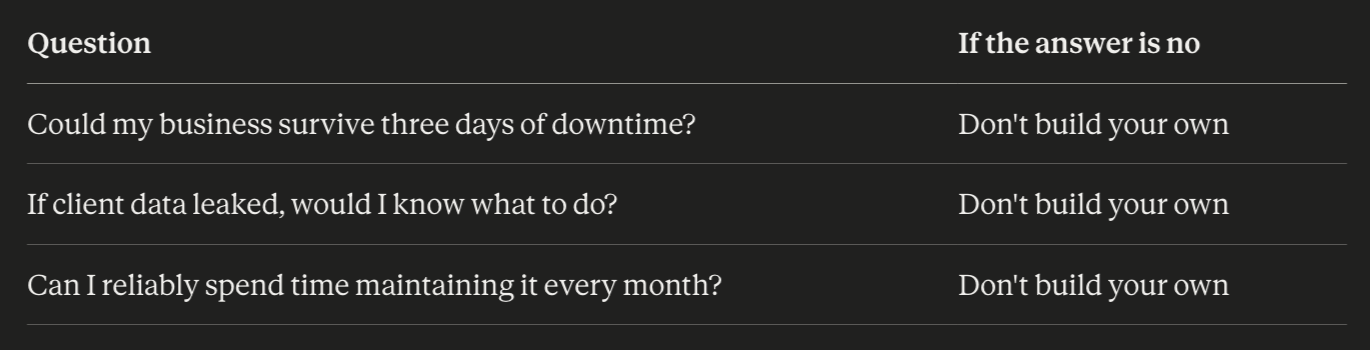
Three yeses and DIY may genuinely pay off for you. Any no, and what you'd be buying isn't software — it's not having to think about any of this.
📝 Frequently asked questions
⭕️ Is AI-written code actually insecure?
Not insecure — insecure *by default*. AI implements the functionality you describe. Unless you explicitly ask for input validation, permission checks, and encryption, it usually won't add them. The difference is knowing what to ask for.
⭕️ I'm a small studio — would anyone actually attack me?
Most attacks aren't targeted. Automated scanners sweep broadly for known vulnerabilities regardless of who owns the site. Being small doesn't keep you off the list.
⭕️ Does using Notion or Google Forms count as DIY?
No — that's using the free tier of commercial tools. The risk profile is completely different, since the data lives on their servers and security is their responsibility. The trade-off is that booking logic has to be filled in manually, which stops scaling fairly quickly.
⭕️ Can I migrate to a commercial system later?
Depends how you built it. If data lives in a standard database and exports to CSV, most systems can import it. If the format is unusual or the data is scattered, you may be reorganising it by hand — or asking clients to re-register.
⭕️ AI keeps improving. Will it replace booking systems?
AI will keep making systems easier to build, and that trend won't reverse. But a booking system's value was never only the code — it's security responsibility, compliance responsibility, uptime, and business logic accumulated across thousands of venues. Those don't have the same cost structure as writing software.
🌟 Where we stand
Our conflict of interest is obvious: we sell a booking system, so of course we'd rather you didn't build your own.
In practice, though — if your needs really are simple, use a free tool or build it yourself. We genuinely don't mind. Selling a commercial system to someone who needed a Google Form means they churn in three months. That helps nobody.
Omcean Booking suits studios with class passes, multiple instructors, online payments, and a real cost to downtime — where the owner's time is worth more teaching than maintaining code.
We take no transaction commission and charge no setup fee, and currently serve around 600 movement studios and venues. If you're evaluating options, how booking system costs actually add up will help you work out the real total first.
Was this article helpful?