How to Choose a Booking System: From Free Tools to Fully Automated Platforms

by Sarah Chen
· 10 min read

When choosing a booking system, the market generally offers three categories: free tools (like forms and calendars), generic online schedulers, and commercial booking systems that integrate memberships, payments, and automation. When making your choice, don't just look at the price tag—make sure the system supports 24/7 online booking, automated reminders, online payments, class pass tracking, and calendar syncing, all while fitting your specific business model.
If you're tired of endless LINE messages, manual form entries, and updating spreadsheets, a professional system like OmceanBooking consolidates your scheduling, memberships, classes, payments, and automated management into one single dashboard. It is the ultimate solution to lower administrative costs and digitally transform your business.
What is a Booking System, and What Problems Does It Solve?
A booking system is a digital tool that allows clients to choose services, dates, and time slots online. It helps business owners centralize appointment records, member profiles, automated notifications, and payment processing. Advanced systems can even handle complex class scheduling, waitlists, class pass deductions, and automated marketing, drastically cutting down manual confirmation time.
Without a booking system, businesses typically face these pain points:
- Overflowing LINE Messages: Clients asking for availability outside business hours. If you don't reply instantly, you lose the lead.
- Double-Booking: Manual scheduling errors leading to two clients booked for the same slot.
- No-Shows: Without automated reminders, clients forget their appointments, causing you to lose revenue.
- Scattered Data: Appointments in LINE, rosters in Excel, and payments in your banking app. Reconciling accounts and class passes becomes an absolute mess.
What Are Some Free Booking Systems? Are They Enough?
"What free booking systems are out there?" This is usually the first question for new business owners. Common free tools include Google Forms, Google Calendar, or the basic free tiers of commercial platforms (like SimplyBook.me). While they save money initially, they often come with severe limitations in automation and advanced operational features.
Here is a quick comparison of common booking tools:
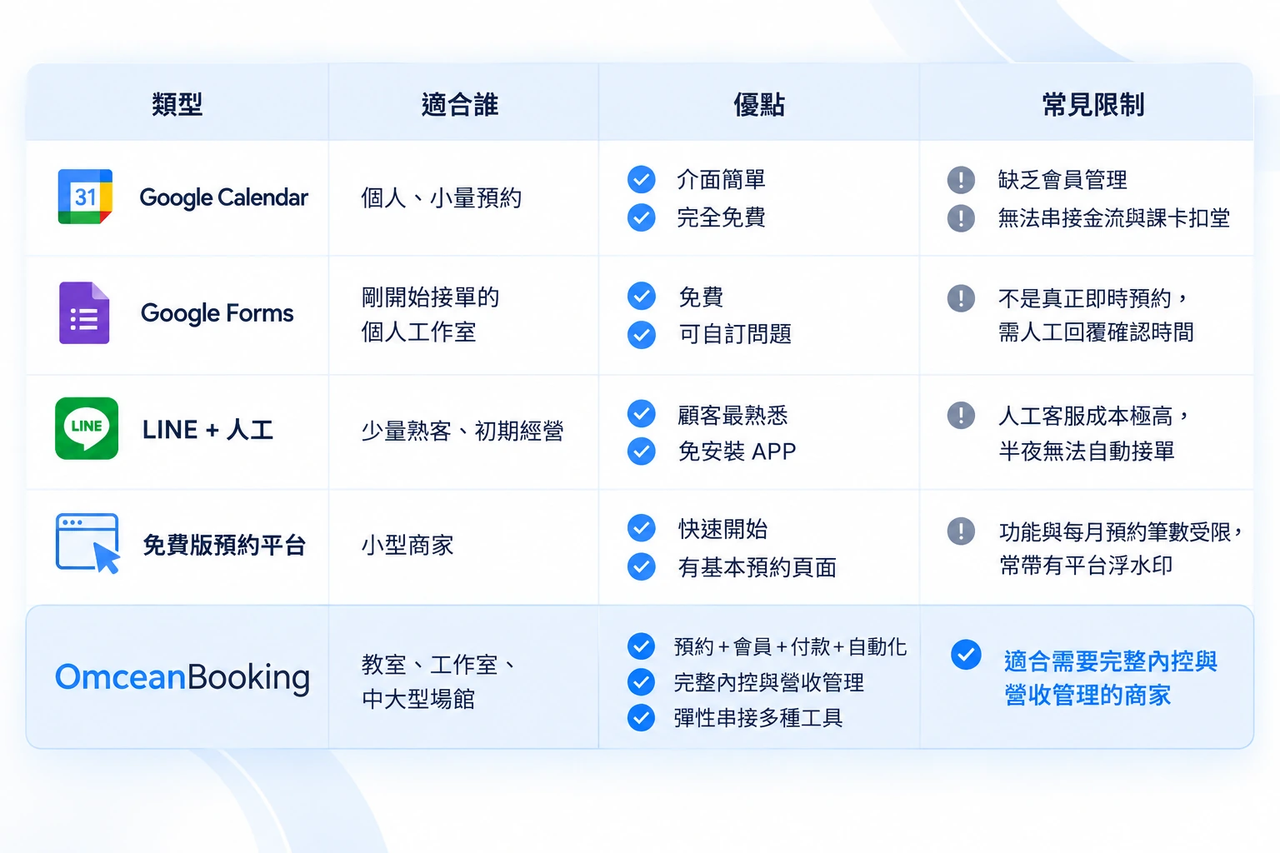
What's the Difference Between LINE, Google Calendar, and a Professional System?
Simply put: LINE is a messaging app, and Google Calendar is a personal planner. A professional booking system, however, is a fully automated digital front desk that handles the entire customer journey—from booking and payment to class deduction and pre-visit reminders.
Can I use LINE directly as a booking system?
Without third-party integration, an official LINE account cannot function as an automated booking system. It relies entirely on 1-on-1 manual chats to confirm times and track remaining classes. At higher volumes, this inevitably leads to missed messages and disputes over remaining credits.
Can Google Calendar work as a booking system?
It offers a basic "appointment schedule" feature for picking time slots, but it lacks business logic. It cannot require clients to pay a deposit online, automatically deduct a session from a 10-class pass, or set exclusive booking permissions for VIP members.
When should I upgrade from free tools?
When the time spent on administrative chores starts eating into your time serving clients, or when manual errors lead to double-bookings, billing mistakes, or customer complaints. That's your cue to upgrade.
As your bookings grow, OmceanBooking allows clients to self-book while centralizing all appointments, member data, and notifications. This frees your staff from the nightmare of copy-pasting data between LINE, Google Calendar, and Excel.
8 Must-Have Features to Look For in a Booking System
Before making a choice, ensure the system includes these 8 core features to solve real operational bottlenecks:
1️⃣ 24/7 Online Booking
The Problem: Clients want to book late at night, but your front desk is closed.
The OmceanBooking Solution: A dedicated booking website and APP let clients view schedules and book instantly anytime, turning your sleep hours into revenue.
2️⃣ Real-Time Capacity & Waitlist Management
The Problem: Popular classes overfill, or someone cancels and you can't fill the spot in time.
The OmceanBooking Solution: Real-time availability linked directly to your capacity. If a class is full, the automated waitlist kicks in, instantly filling spots when someone cancels to maximize attendance.
3️⃣ Automated Reminders
The Problem: Clients forget their bookings, resulting in no-shows.
The OmceanBooking Solution: The system automatically sends out pre-class reminders, significantly reducing no-shows and protecting your revenue.
4️⃣ Multi-Channel Notifications (LINE / APP)
The Problem: Manually notifying clients about successful bookings or changes takes too much time.
The OmceanBooking Solution: Automated push notifications via LINE and OB APP for purchases, bookings, and cancellations, ensuring a professional brand image.
5️⃣ Google Calendar Syncing
The Problem: Instructors' personal calendars don't match the studio's system.
The OmceanBooking Solution: Two-way sync keeps instructors updated with their class schedules on the go, making roster management a breeze.
6️⃣ Membership & Client Management (CRM)
The Problem: Paper punch cards make it hard to track remaining sessions. Setting up corporate or group classes is a hassle.
The OmceanBooking Solution: Comprehensive digital member profiles tracking purchase history and consumption. Our batch-add feature even allows you to issue class passes to multiple students at once—perfect for corporate accounts.
7️⃣ Online Payments & Deposits
The Problem: Clients book but delay payment, costing you money if they no-show.
The OmceanBooking Solution: Supports multiple gateways like credit cards and LINE Pay. You can require upfront payment or deposits to secure a booking.
8️⃣ Automation & Custom AI Management
The Problem: Every studio has unique cancellation policies and refund rules that generic systems can't handle.
The OmceanBooking Solution: Packed with nearly 30 custom features, from digital contract terms to advanced permission settings, it flexibly adapts to your complex business models.
What Kind of Businesses is OmceanBooking Right For?
If you're currently dealing with any of the following, OmceanBooking will be your lifesaver:
- Drowning in LINE messages to confirm bookings, blurring the line between work and personal life.
- Still using Excel or paper tally marks to track clients' remaining class passes.
- Dealing with frequent no-shows because manual follow-ups are too tedious.
- Struggling with complex payroll and commission calculations for multiple instructors at the end of the month.
- Finding discrepancies between your Google Calendar records and actual check-ins.
We are specially tailored for yoga studios, pilates centers, gyms, and appointment-based businesses. We help you eliminate administrative chaos so you can focus on delivering high-quality teaching and services.
Booking System FAQ
Q: What are some free booking systems?
A: Common free tools include Google Forms, Google Calendar's appointment scheduling, and basic tiers of platforms like SimplyBook.me (though these usually restrict features and monthly booking volumes).
Q: Can LINE be used as a booking system?
A: By itself, an official LINE account only offers chat and rich menus; it cannot automate time slots or deduct class passes. You must integrate a professional booking system to achieve true automated LINE booking.
Q: Can Google Calendar work as a booking system?
A: It provides basic time-slot selection but lacks essential business tools like payment gateways, membership tiers, automated waitlists, and class pass deductions.
Q: Are free booking systems suitable for long-term use?
A: Generally, no. As your client base grows, free systems can't handle complex rostering, accounting, or CRM, eventually leading to massive administrative costs and error risks.
Q: How much does a booking system cost per month?
A: Depending on the feature set, commercial systems range from a few dozen to a few hundred dollars a month. We highly recommend finding a platform with a free trial to test if it fits your operational logic.
Q: Can booking systems send automated reminders?
A: Yes! Professional systems like OmceanBooking automatically send pre-class reminders via Email or LINE, effectively lowering your no-show rate.
Q: Can booking systems integrate with LINE and Google Calendar?
A: Most mature commercial systems do. OmceanBooking, for instance, offers two-way Google Calendar syncing and seamless LINE integration, allowing clients to book in an interface they already use daily.
Q: What is OmceanBooking, and who is it for?
A: OmceanBooking is an all-in-one booking and management system designed specifically for brick-and-mortar studios. It integrates online scheduling, class pass management, payments, and automated marketing. It's highly recommended for yoga studios, fitness centers, and appointment-based workspaces. We offer a 7-day free trial—experience the power of automated operations and break free from the limits of free tools!
Was this article helpful?

