How to Choose Between LINE and App Booking Systems After LINE's Price Hike?

by Emily Zhang
· 18 min read
Sending a LINE message now requires doing math first?
For many studios, classes, and service-oriented shops, LINE was incredibly useful at the beginning. A customer asks for a time, a teacher replies, and the front desk logs it—a few messages back and forth complete a booking. When you first open your shop, this feels intuitive and personal.
But as your customer base slowly grows, problems begin to surface.
In the morning someone asks about a trial class, in the afternoon someone reschedules, and at night you have to notify the waitlist, send reminders for tomorrow's classes, and push the new schedule for next month. You thought you were managing customer relationships, but you later realize you are running a small message center.
Even more painful is the upcoming price adjustment for LINE Official Accounts. According to the LINE Official Account pricing adjustment announcement, starting November 1, 2026, the monthly fee for the Medium Plan will increase from 800 NTD to 1,000 NTD, and the High Plan will increase from 1,200 NTD to 1,400 NTD; the number of messages included in each plan remains unchanged, with the Light, Medium, and High plans offering 200, 3,000, and 6,000 messages per month, respectively. For the High Plan, once the included quota is exceeded, the first 50,000 additional messages will cost 0.2 NTD each, and from the 50,001st message onwards, the cost will be 0.15 NTD each, using a tiered progressive pricing structure.
Let's be clear: this doesn't mean "stop using LINE."
LINE remains excellent for customer communication, marketing exposure, and relationship maintenance. What really needs to be reconsidered is whether repetitive daily processes like booking, rescheduling, waitlisting, checking class passes, sending reminders, and checking in still need to be crammed into LINE conversations.
What OmceanBooking wants to help you calculate in this article isn't just the monthly message fee, but also the increased booking management costs that come with a growing customer base.
Which Types of Shops Are Truly Affected by the LINE Official Account Price Increase?
Which LINE 1-on-1 chats, mass broadcasts, and booking reminders are charged?
Not every conversation on a LINE Official Account is charged. According to official guidelines, 1-on-1 chats in the Official Account backend, automated responses, welcome messages for new friends, and Reply API responses from the Messaging API are all free of charge.
Therefore, if a customer asks, "Is there a class tomorrow?" and you reply, you aren't immediately losing money.
However, if the system proactively sends booking confirmations and class reminders using the Push API, these will be counted against your message quota. According to LINE Messaging API billing rules, whether a message is charged depends on the sending method, not just on whether the content is a "reminder" or if it is only sent to one person.
What really makes costs noticeable are usually "proactive mass broadcasts" or "segmented push notifications." For example:
* You need to notify 1,500 friends that next month's schedule is available.
* You need to push holiday business hours to 800 members.
* You want to send a promotional offer to 2,000 existing customers.
* You want to proactively remind a specific group of students that their class passes are about to expire.
Once the frequency of these messages increases, the cost is no longer just the monthly fee; it can increase alongside the actual number of recipients and the number of broadcasts.
What Are the Monthly Fees for Each Plan After the 2026 LINE Price Increase?
Based on the new plans announced by LINE, here are the prices for Taiwan starting November 1, 2026 (all amounts are in NTD and exclude tax):
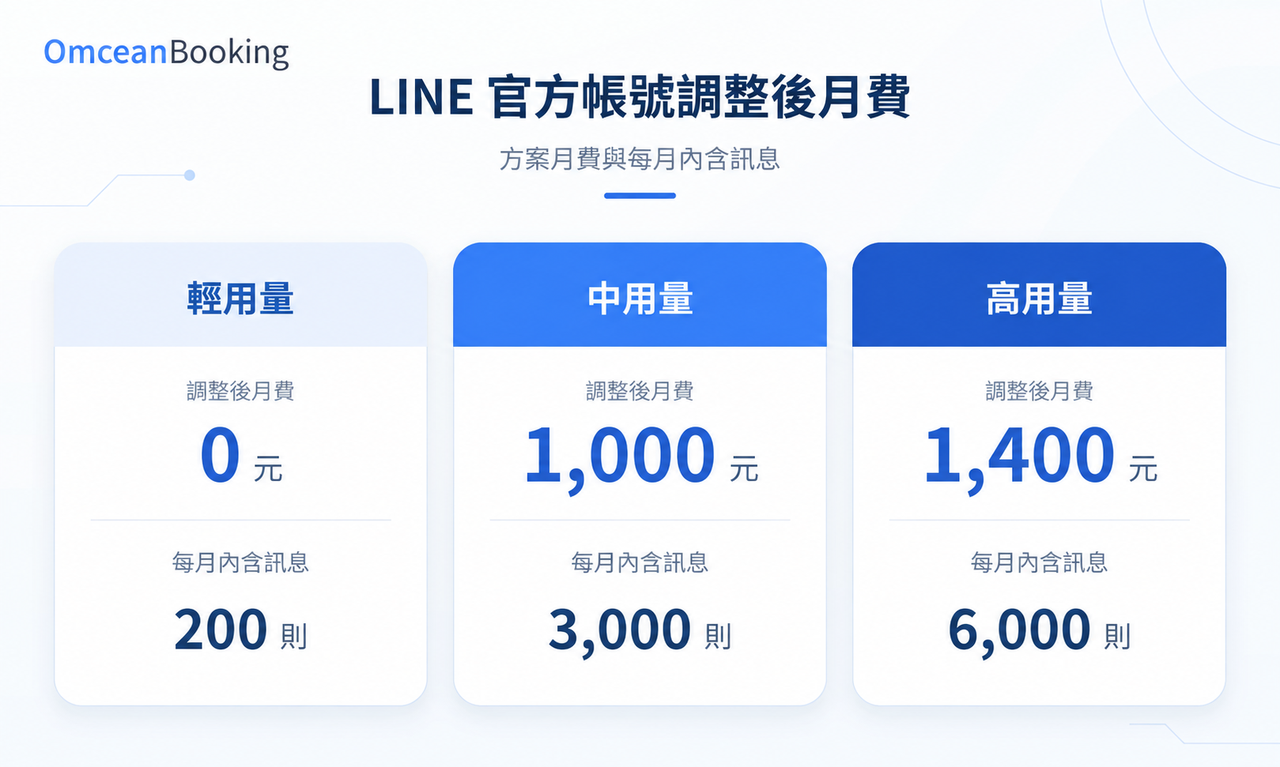
The Light Plan has a monthly fee of 0 NTD and includes 200 messages. You cannot purchase additional messages.
The Medium Plan has a monthly fee of 1,000 NTD and includes 3,000 messages. You cannot purchase additional messages.
The High Plan has a monthly fee of 1,400 NTD and includes 6,000 messages. Once the included quota is exceeded, the first 50,000 additional messages will cost 0.2 NTD each, and from the 50,001st message onwards, the cost will be 0.15 NTD each, using a tiered progressive pricing structure.
How Much Will LINE Message Costs Differ with Increased Friends and Broadcast Frequency?
Let's do a simple calculation. We assume that every time, messages are sent to all friends capable of receiving them, and there are no other chargeable messages that month.
Mass broadcasting a schedule, event, or announcement 4 times a month to 3,000 friends capable of receiving messages.
3,000 people × 4 times = 12,000 messages.
Calculated using the aforementioned High Plan:
1,400 NTD monthly fee + (12,000 - 6,000) × 0.2 NTD = 2,600 NTD (excluding tax) per month.
If the number of recipients increases to 5,000 people per broadcast, and you still broadcast 4 times, that's 20,000 messages, resulting in a monthly cost of 4,200 NTD (excluding tax).
And this doesn't even account for the time spent creating materials, manually replying, and organizing bookings.
The truly painful part is: sometimes the message you paid to send just results in a customer replying on LINE, "So, which day can I book?"
And the cycle starts all over again.
Why Is the OmceanBooking App Booking System More Cost-Effective as Customer Volume Grows?
When many shops compare LINE and App booking systems, they directly ask, "Which one is cheaper?"
But the more accurate question should be: As customer volume increases, which one is less likely to turn every booking into a manual conversation?
LINE is suitable as a "communication portal," while an App or booking system is suitable as a "process portal."
Free App Push Notifications Reduce Reliance on LINE Message Quotas
OmceanBooking features built-in free App push notifications that can be used to handle supported booking notifications; paired with the announcement notification feature, you can also publish class and service changes in the App for customers to read and confirm.
Taking the previous scenario of 20,000 messages per month as an example, if 3 of those notifications are sent via the App, leaving only 1 LINE mass broadcast, the LINE usage drops to 5,000 messages. The cost drops from 4,200 NTD to 1,400 NTD, saving 2,800 NTD in LINE expenses per month.
Routing LINE and App Notifications Accommodates Both New and Regular Customers
"But some customers are still only used to using LINE, or new customers have just joined. I can't force them to download an App just to receive notifications, can I?"
Actually, saving on message fees doesn't mean you have to convince every customer to "migrate" first.
OmceanBooking provides a notification routing feature. For supported notifications, messages can be sent via LINE or the App based on the customer's linked accounts and notification settings, eliminating the need to duplicate notifications for the same customer.
New customers who prefer LINE can continue receiving messages via LINE; regular customers who are used to booking via the App can receive free push notifications. New and existing customers don't have to use the same channel, satisfying notification needs while reducing unnecessary charged LINE messages.
Shops can also directly view the number of LINE messages sent in the OmceanBooking backend, allowing for real-time tracking of quota usage. You can see how many messages have been sent this month and what schedule updates or event announcements are coming up, allowing you to plan based on usage rather than waiting until the quota is almost empty to worry about whether the next message should be sent.
When setting this up, you still need to confirm the receiving conditions: personal LINE notifications require the relevant account to be linked; App notifications require the customer to have downloaded, logged in, and enabled notifications. Shops can follow the OmceanBooking App push notification setup guide to verify login devices and notification settings, and send a test notification to avoid a situation where the process is set up but the customer's notification permissions aren't enabled.
Self-Service Booking Saves More Than Just the Cost of Sending Messages
Suppose you just checked a teacher's Wednesday availability, and the customer replies, "What about Thursday?" After confirming Thursday, they say, "Let me check with a friend first."
The amount of messaging required to finalize a single booking might far exceed your imagination.
Through OmceanBooking's class scheduling and booking features, members can view available times, teachers, and capacity, and complete the booking themselves; 1-on-1 services can utilize the time-slot booking feature, and class passes allow customers to check their remaining balance via session and credit plans.
Assuming 300 bookings a month, saving 3 minutes of manual processing per booking equals 900 minutes, or 15 hours.
Even the various fragmented times spent logging, calculating, and cross-checking are part of the cost.
LINE Booking Management vs. App Booking Systems: What Are the Differences in Cost and Functionality?
Let's clarify first: manually taking orders on LINE is not the same as integrating a LINE booking system.
For instance, OmceanBooking's LINE booking integration allows customers to open the schedule from the Official Account and book themselves. Therefore, the comparison below focuses on the differences between "managing solely through manual LINE conversations" and "centralized management via an App/booking system."
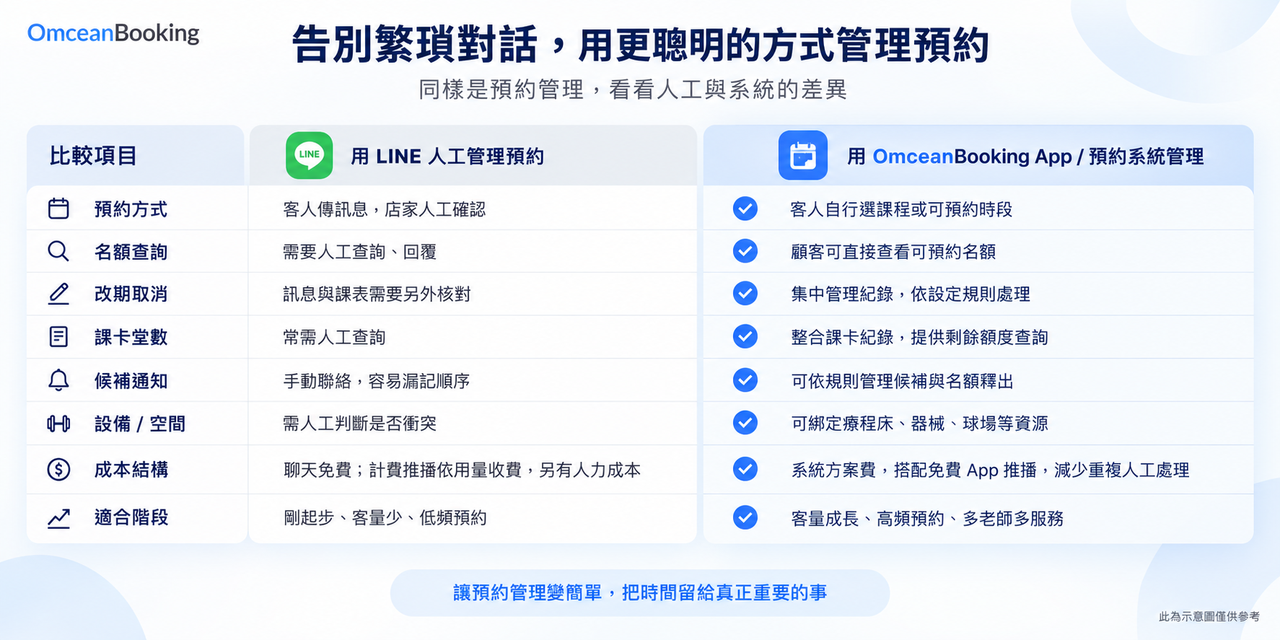
If you rely on manual LINE conversations, the booking portal requires joining LINE to start a chat. You must manually check available slots, and if a class is full, you have to manually record waitlist requests. Reminders are either sent manually or via paid broadcasts, and resource allocation is tracked manually or mentally. You must also manually cross-reference class passes and check-in statuses, and the customer cannot query their own records.
If you use an App/booking system, the booking portal can be LINE, the App, or a webpage. Slots are synced in real-time, and waitlists are handled automatically when a class is full. Reminders are automated through the system (and free via App push). Resources are automatically conflict-checked based on settings, and class passes and check-in statuses are automatically updated in the backend. Customers can check their own records.
A crucial point here is "resource management." Resources like Pilates reformers, beauty treatment beds, massage rooms, and badminton courts cannot be booked simply because "the teacher is free."
OmceanBooking's equipment management feature can create resources like treatment beds, salon chairs, courts, or reformers, and only allows customers to complete a booking if the required equipment is available.
This is where relying solely on LINE conversations becomes difficult.
LINE can handle conversations in real-time but cannot automatically organize venues, teachers, equipment, class passes, and waitlist orders all together.
Which Industries Should Pay the Most Attention to LINE Message Costs and App Booking Management?
Not every shop needs to switch to App booking immediately. But if your shop has needs like "high-frequency bookings, regular return visits, multi-staff scheduling, capacity limits, or class passes/packages," especially if several apply, you should consider evaluating it:
Yoga, Pilates, and Gym Bookings: Managing Capacity, Waitlists, and Class Passes Together
For shops operating yoga studios, Pilates studios, gyms, and personal training courses, managing group class capacity, waitlists, class pass balances, teacher schedules, and last-minute rescheduling are daily tasks.
Asking about classes on LINE is convenient at first, but when members start attending regularly, handling bookings, cancellations, make-up classes, and reminders every week can quickly lead to message fatigue. This is especially true for Pilates, which has equipment limits—just because "the studio has space" doesn't mean "there are beds available."
Beauty, Nail, Hair, and Massage SPA Bookings: More Than Just a Time Slot
Bookings for beauty and nail studios, hair salons, massage parlors, and SPA providers usually involve more than just a time slot. They also include a designated service provider, treatment duration, room equipment, remaining package sessions, and the return visit cycle.
If everything is recorded on LINE, when there are many regular customers, questions like "Which plan did she do last time?", "How long should we reserve this time?", and "How many sessions are left in her package?" can easily arise.
Therefore, having every service detail recorded directly in the system not only makes tracking easier but also allows different service providers to better understand customer needs when taking over.
Tutoring Centers and Talent Class Bookings: Leave of Absence, Make-up Classes, and Course Notifications
For tutoring centers, talent classes, and children's courses, if parents' messages tend to cluster after class, on weekends, or right before class starts, it's easy to encounter situations where everything happens at once.
If leaves of absence, make-up classes, class transfers, reminders to bring supplies, and sudden announcements are all handled one by one on LINE, teachers will quickly turn into a part-time customer service center.
Swimming, Badminton, and Tennis Court Bookings: If the Coach is Free, the Venue Must Also be Free
For industries like swimming facilities, badminton centers, and tennis courts, it is crucial to ensure that "resources are actually available."
For the same time slot, you might need to simultaneously confirm the coach, venue, lane, or equipment. You can ask on LINE, but a system is better suited to automatically check for conflicts based on its settings.
Pet Grooming and Care Service Bookings: Find the Previous Record Before the Next Visit
Services like pet grooming, lactation care, and health management centers often require looking at previous records.
It's not just about asking "What time are you free?", but also knowing past services provided, precautions, designated personnel, and the time for the next visit. As customer volume grows, having records centralized in a system makes them much easier to find than if they were scattered across conversations.
FAQ: How to Choose Between a LINE Booking System and the OmceanBooking App?
Do shops absolutely have to switch to an App after the LINE Official Account price increase?
Not necessarily. If your customer volume is small, booking frequency is low, and your service items are simple, managing via LINE is still viable. However, if you are already frequently sending out schedules, announcements, and event notifications, or if you spend every day dealing with rescheduling, waitlists, and checking class passes, it is worth evaluating whether to hand over the booking process to an App or booking system.
Will using an App for booking feel troublesome to customers?
Downloading and logging in do add an extra step, so the booking portal, schedule, and operating process must be clear enough for customers to feel the convenience of checking times and booking directly themselves.
You also don't need to force all customers to change their habits at once. OmceanBooking retains a LINE booking portal that doesn't require an additional App download, allowing you to guide regular members first.
After using an App booking system, do I still need to keep LINE?
We recommend keeping it. LINE is excellent for customer relations, customer service, driving traffic for announcements, and marketing interaction. However, high-frequency processes like booking, which require data verification and record-keeping, can be handled by the system, so you don't have to rely on chatting for every step.
When does it mean I should switch from manual LINE orders to a booking system?
If you are already frequently encountering missed bookings, repeatedly confirming times, chaotic waitlist orders, spending a long time checking class pass balances, and sending more and more push notifications, these are all signs that your processes are worth re-evaluating.
It's not that you aren't working hard enough; it's that your processes have grown and require a new tool to handle them.
Conclusion: More Customers is a Good Thing, and Booking Management Must Grow Too
LINE is great for initiating a relationship, but it isn't necessarily suited to shoulder the entire booking process.
As you get more and more customers, what you really need to save isn't just the monthly message fee, but the time slowly being eaten away every day by bookings, rescheduling, reminders, and waitlists.
Relying on LINE at the beginning provides the flexibility needed in the early stages of a startup.
Later on, using an App and a booking system to handle the processes is a gentle form of self-rescue for a growing shop.
If you no longer want to be held hostage by LINE message quotas and endless chat screens, let OmceanBooking help you organize your bookings, schedules, class passes, and reminders into a much easier workflow.
By letting customers complete what they can do themselves, you and your team will have fewer repetitive queries and more breathing room to take care of the customers right in front of you.
Book a one-on-one OmceanBooking consultation now. We can start by calculating your current notification volume and booking methods, and you can try the booking management system for free to see which daily tasks can truly be minimized.
Was this article helpful?