2026 Pilates Booking System Guide

by David Kim
· 15 min read

How to Choose a Pilates Booking System in 2026? A Complete Guide to Scheduling, Class Passes, and Private Sessions
The last class is over, the reformers are wiped down, and you've said goodbye to the final student. You pick up your phone, only to find several messages waiting for you: "Teacher, how many sessions do I have left?" "Are there any private slots open this Friday?" "Can you let me know if someone cancels?"
Running a Pilates studio is hard work—and teaching is only half of it. The other half is filled with endless administrative tasks and management duties. When group classes, private sessions, trial packages, and various class passes all exist simultaneously, a single booking involves coordinating instructors, equipment, remaining session counts, and expiration dates.
When choosing a Pilates booking system, prioritize how it handles group and private scheduling, class passes and memberships, waitlists, course series, customer service, and instructor management. It should align with your studio's actual workflow, make it easier for students to book classes, and save teachers from dropping everything to constantly look up data.
Why Do Pilates Studios Need a Booking System?
If you only have a small number of regular students, using LINE and Excel works just fine. The real issue arises when a single booking modification needs to be updated across multiple places.
For example, if a student changes their Wednesday group class to Friday, you have to check Friday's availability, verify their class pass validity, update the roster, and finally notify the instructor. If you miss syncing even one of these steps, you might face an awkward "I thought it was already changed" misunderstanding when the student arrives.
Therefore, when evaluating a system, track how much time you spend checking and confirming things daily, rather than just looking at your current member count. When these tasks start eating into your class prep and rest time, it's time to streamline your workflow.
6 Core Features Every Pilates Booking System Needs
1. Unified Scheduling for Group & Private Classes (Factoring in Instructors & Equipment)
Recurring group classes and private sessions require different booking logics.
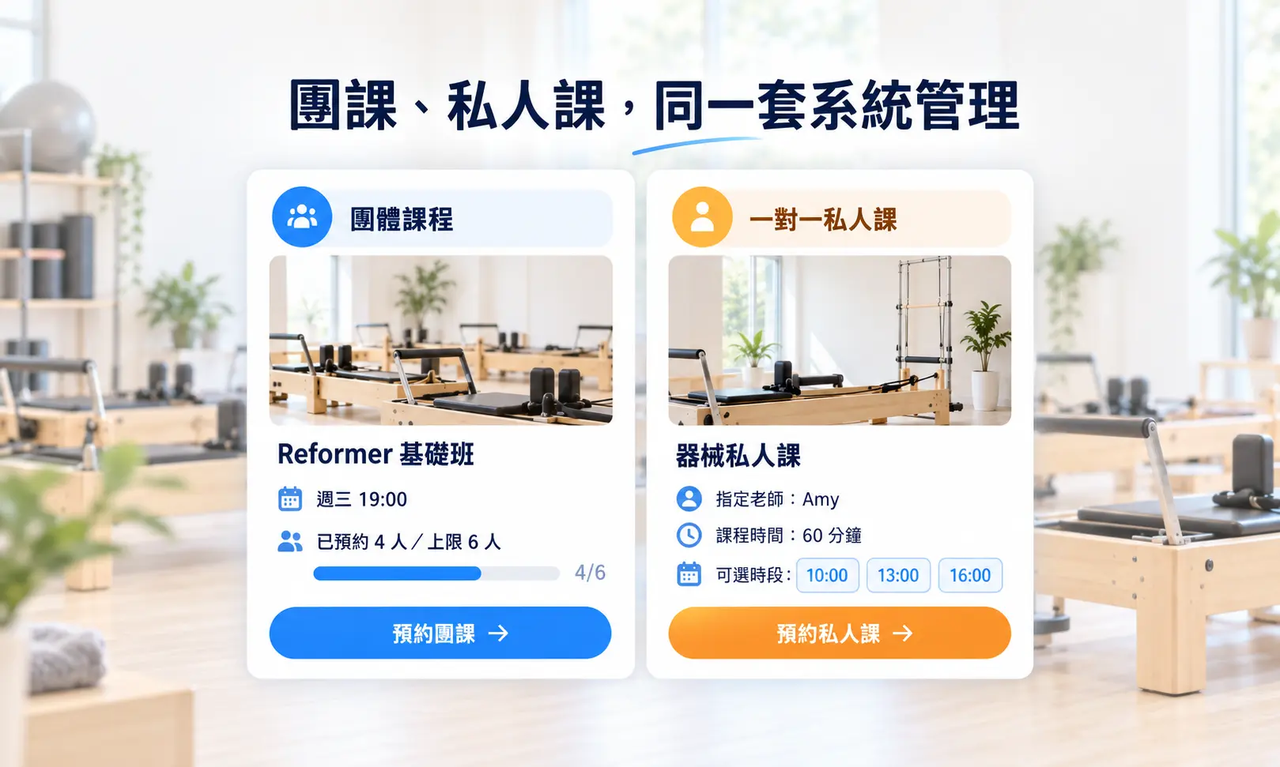
For a 6-person Reformer group class on Wednesday at 7 PM, students simply select a class that still has spots. For a private session, however, they might need to pick an instructor first and then find a mutually convenient time. Tools that only support fixed schedules struggle to handle private bookings smoothly.
OmceanBooking offers both group class and 1-on-1 booking modules. Both modes share the same student database, and private sessions allow students to select both their preferred instructor and available times.
"Think about booking a private session manually: A student asks, "Does Friday at 4 PM work?" during their lunch break. You reply "Yes" during your break between classes. By the time they finish work and see your message, that slot has already been taken by someone else. You go back and forth trying to match schedules, and a whole week might pass without a successful booking. Half of your messages are spent apologizing for delayed replies. This often leads to students giving up on booking altogether, and the constant calendar-checking is mentally exhausting."
Furthermore, just because a teacher is free doesn't mean the equipment or studio space is. If group classes and private sessions share Reformers, equipment usage must be tracked. OmceanBooking allows you to set equipment resources and capacities, linking them to specific classes or services. A booking that requires specific resources can only be confirmed if the equipment is available.
2. Clear Class Passes, Session Counts, and Expirations for Everyone
A 10-session group pass, a private session package, and a single-trial pass shouldn't just be distinguished by name. You need to know exactly which classes they apply to, how sessions are deducted, and when they expire.
OmceanBooking supports both session-based and credit-based class passes, allowing you to set expiration dates and letting students check their own balances. Different courses can be paired with applicable credit plans.
When setting up products, test them using real-world scenarios: If a student holds both a group pass and a private pass, how do they choose at checkout? What happens when they don't have enough sessions left? What if they try to book a date past their pass expiration? Clarifying these rules in advance prevents the awkward front-desk conversation of "Sorry, you can't use this pass for this class" after the student has already arrived.
For monthly or long-term memberships, recurring membership features can handle pricing, billing cycles, and cancellation terms. OmceanBooking allows session passes and recurring memberships to coexist, but always communicate usage and renewal terms clearly so students don't mistakenly think a monthly membership guarantees a permanently reserved weekly spot.
3. Automated Waitlists for High-Demand Equipment Classes
If your studio only has six Reformers, a cancellation in a full class opens up one machine. The tragedy isn't just losing a booking; it's that someone else desperately wanted to attend but didn't know a spot opened up.
OmceanBooking's waitlist feature allows students to sign up when a class is full. The studio can view all waitlisted users in one place and set up automated notifications when a spot frees up. You can customize whether the student needs to take action after receiving the notification and what constitutes a successful booking. For last-minute cancellations, you can also factor in the student's travel time.
Setting clear workflows lets eager students know the next steps, and saves your studio from scrolling through LINE to find who asked about availability. Rather than just saying "I'll let you know if a spot opens," both parties get a clearer, automated arrangement.
4. Course Series: Book the Whole Set at Once
If you launch a "6-Week Intro to Reformer" course, the curriculum is designed continuously; students aren't just buying six independent chances to fight for a spot.
With OmceanBooking's course series feature, you can link a pass to specific sessions, automatically generating all related bookings upon purchase. This eliminates weekly re-registrations and manual roster checks.
Before scheduling, list all six class dates to ensure they don't land on studio holidays. Clearly outline policies for mid-course absences, make-up classes, and whether make-ups require separate bookings. Course series are perfect for locking in fixed schedules, while flexible passes offer freedom of choice, giving you maximum versatility in curriculum design.
5. LINE & AI Assistants to Handle FAQs
"Where can I park?" "What should I bring for my first class?" "What's the latest I can cancel?"
If these questions have fixed answers, why are your teachers typing them out manually every single time?
OmceanBooking integrates with LINE Official Accounts, providing a booking portal right in the chat. The AI Customer Service Assistant can reply based on the knowledge base and Q&As you provide (and you can test the answers before going live).
"Imagine a new student is at the front desk ready for a studio tour, but your phone is blowing up with someone trying to cancel a class starting in 10 minutes. Which do you handle first? If your digital AI receptionist instantly handles the cancellation via message, you can focus entirely on the person in front of you. It's like having a 24/7 intelligent employee—instantly reducing your stress levels!"
Internally, the Obie AI Management Assistant helps you query bookings, class passes, and operational data, or perform backend management tasks. Changes requiring approval are sent to you for confirmation, saving staff time while maintaining security.
6. Scheduling, Attendance, and Payroll: Log Daily, Settle Monthly
As you grow from teaching solo to collaborating with multiple instructors, you aren't just adding classes—you're managing substitute arrangements and varying pay structures.
For instance, private classes might be paid per session, while group classes have a base rate adjusted by attendance. OmceanBooking allows you to set custom payroll rules based on teaching and attendance data, making reconciliation a breeze.
Payroll can be adjusted based on booking numbers, actual attendance, and last-minute subs. By keeping records in the backend daily, you won't have to scroll through chat histories at the end of the month trying to remember "who actually subbed that Wednesday." Instructors can clearly see how their pay was calculated, eliminating back-and-forth disputes over amounts.
How to Choose a Pilates Booking System? Test It With Your Own Schedule!
Solve the biggest bottlenecks first; don't try to use every feature on day one.
Think back over the past week: what made you pick up your phone the most? Was it constantly rearranging private sessions, checking session balances, or managing waitlists? Use these pain points to prioritize features, then evaluate if the system can scale when you add more teachers or classes. It's okay to keep workflows simple when starting out—the goal is to automate repetitive tasks.
Walk through the student booking flow.
Take an existing class pass, a group class, and a private instructor, and walk through the entire process from searching for a class and selecting a plan to canceling a booking. Test scenarios like full classes or expired passes to see if the interface communicates clearly. Have a friend test your current booking process before the trial to identify friction points, so you can use the system settings to solve those exact issues.
The ultimate value of a Pilates booking system is a win-win: smoother booking for students, and time-saving, effortless administration for you.
Pilates Booking System FAQ
What is the difference between LINE, Excel, and a Pilates booking system?
LINE and Excel aren't inherently bad. For a brand-new Pilates studio, they are simple, familiar, and require no learning curve. The real difference emerges as your studio grows. When courses, teachers, and members increase, the amount of data requiring manual upkeep multiplies. A dedicated booking system connects these scattered tasks.
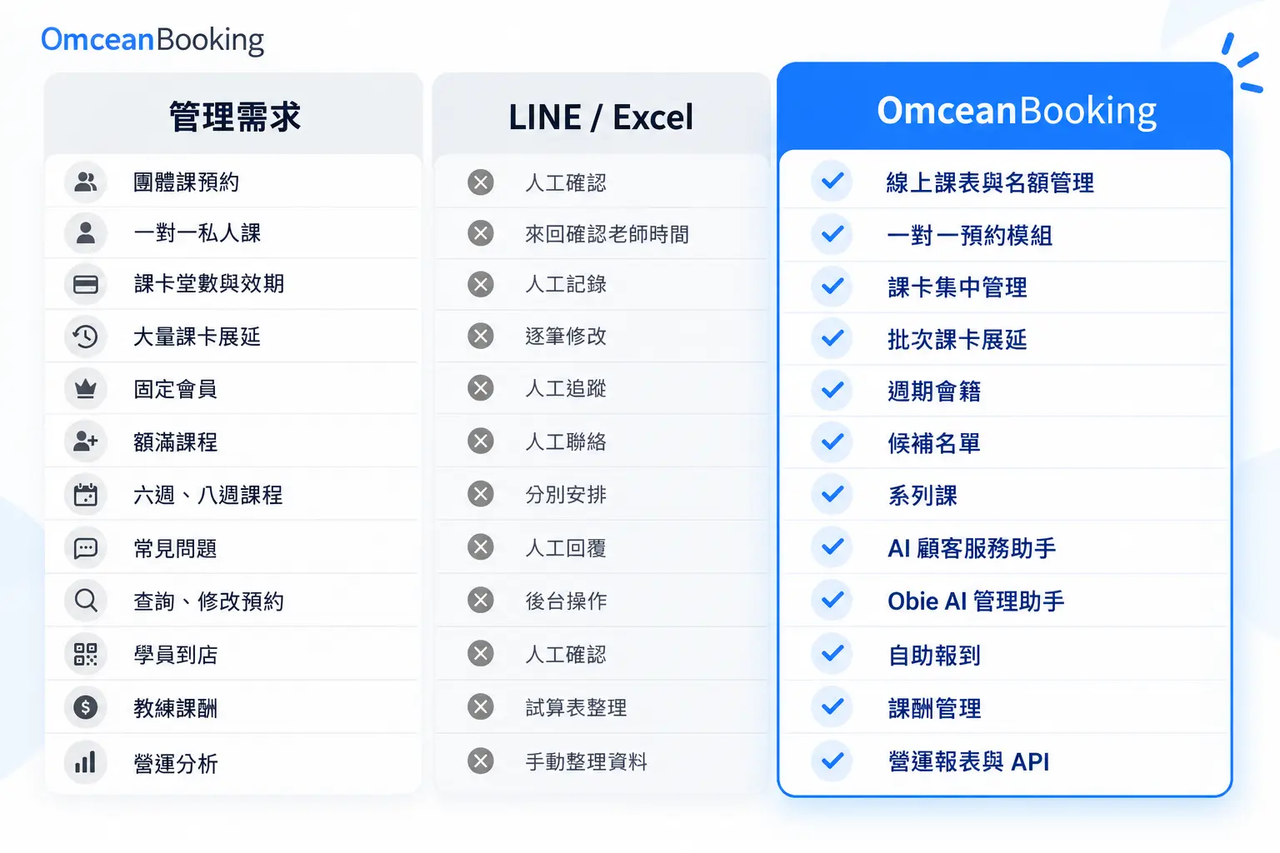
Moving away from LINE and Excel isn't just about moving data to a new place. It's about syncing bookings, passes, members, and instructors so that manual verifications and easily missed details are drastically reduced.
Are booking systems suitable for small Pilates studios?
Yes, but you don't need to use all the features right away. If you only have one teacher and a few fixed group classes, you likely just need online booking, pass management, and notifications. As private sessions grow, you can add 1-on-1 bookings; as regular members increase, you can roll out recurring memberships; and as you hire more teachers, you can activate payroll and advanced management features.
OmceanBooking lets you adopt modules at your own pace based on your current business model. You don't need to build complex workflows for problems you don't have yet. Conversely, as your business grows, you won't have to stretch basic LINE and Excel setups until you're putting out fires every day. A system that grows with your studio is the most comfortable approach.
How do I choose the right booking system for my Pilates studio?
Start with your most time-consuming admin tasks rather than just looking for the system with the most features.
If you focus on equipment-based group classes, prioritize capacity limits, waitlists, and pass management.
If you have a high volume of private classes, ensure the system can handle instructor-specific availability.
If you do both, find a tool that manages both booking models within the same system.
Additionally, consider:
- Do passes, memberships, and classes sync seamlessly?
- Are waitlists supported when classes fill up?
- Do fixed course series require students to rebook weekly?
- Can automated replies reduce your manual FAQ responses?
- As you add teachers, are scheduling and payroll easy to manage?
- Will your data be usable for future operational analytics?
You don't need to fix everything at once. Automating your most repetitive daily tasks will immediately highlight the value of a booking system.
How does OmceanBooking help Pilates studios manage bookings?
OmceanBooking is an operational management system that adapts to your studio's unique business model.
Pilates studios can start with basic group and private bookings and pass management, then expand to use waitlists, course series, recurring memberships, LINE Official Account integration, AI Customer Service Assistants, Obie AI Management, instructor payroll, self-check-in, and operational analytics.
We want our system to handle the tasks that happen every day but don't strictly require a human touch. Students find and book classes easier, teachers do less repetitive admin, and owners gain a clearer picture of their business. Ultimately, bookings, passes, and rosters exist to make the studio run smoother—but your actual time should be spent teaching well, caring for students, and building the studio you envision.
Simplify Bookings, Save Time for What Matters
Running a Pilates studio involves many things worthy of your personal attention. Remembering a move a student struggled with, helping a beginner relax, and watching an anxious client start to look forward to their weekly sessions—these are the truly precious parts of teaching.
As for checking session balances, finding open slots, and repeating cancellation policies? Let the system handle that. You can still provide warm, personalized service to every student without needing to be online 24/7 to prove your dedication.
Whether you are a newly opened small studio or already managing group classes, private sessions, and multiple instructors, you can start with the features you need right now. Let OmceanBooking organize your booking management so you can leave more time for your classes, your students, and yourself.
Let OmceanBooking streamline your booking management, leaving you more time for your classes, your students, and yourself.
👉 Explore OmceanBooking's Pilates Booking Solutions
👉 Book a free consultation to find the perfect features for your studio
Was this article helpful?