- ∞Unlimited bookings
- ✨All AI features included
- 🌐Your own branded booking website
No credit card needed

Let members open the timetable from your LINE Official Account, book their next class and receive reminders in the conversation they already use.
No credit card needed





Create a LINE image & text menu in your brand’s style to effectively guide both new and returning customers to navigate and make reservations on their own.

Make reservations directly on LINE—no additional app download required.

Integrate multiple online payment methods—LINE Pay, credit card, and bank transfer—allowing customers to choose freely and complete transactions quickly.

Worried about students forgetting classes or last-minute absences affecting your income? Send system notifications directly to customers’ LINE app—automatically reminding them and reducing last-minute cancellations and empty slots!
Open LINE Bot / Notifications → Content → AI Chatbot → Replies. Auto replies is the on/off switch. When on, AI answers customer messages; when off, staff handle conversations. Login, registration, and logout remain available. Save after changing settings.
Quick Replies is on the same pill and controls the reply buttons after AI answers. Human handoff controls the pause duration, English/Chinese resume phrase, and acknowledgement sent when staff take over. Configure the shared greeting in AI Chatbot → Settings → Conversation preferences.
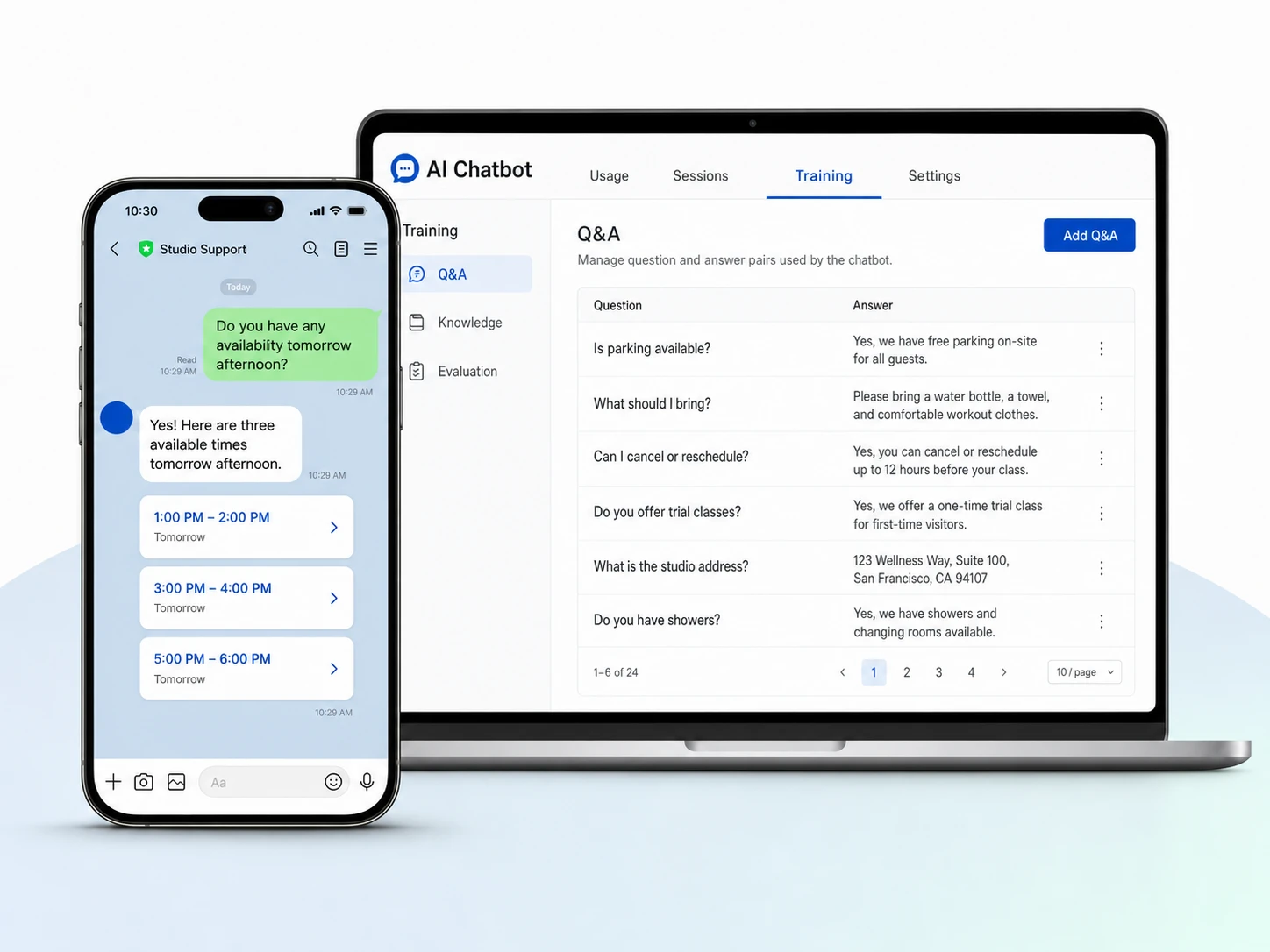
Open LINE Bot / Notifications → Content → AI Chatbot → AI Training. Choose Q&A for individual questions and preferred answers, Knowledge for broader business information, or Evaluation to test responses. This uses the same training as the AI Chatbot page. When the AI Chatbot custom feature is disabled, this pill shows the feature-disabled notice. LINE replies and their US$5 monthly allowance remain available.
LINE AI replies include US$5 of monthly AI usage when the AI Chatbot custom feature is disabled. Enabling that feature provides the configured allowance, normally US$50, and access to AI Training. These are usage credits, not additional monthly subscription charges.
Open LINE Bot / Notifications → Content → AI Chatbot → Usage to see Credits (USD), Used, and the usage table. Customer website chat, LINE AI replies, and Evaluation share the business allowance. Usage resets on the first day of each month. At the limit, AI replies pause until allowance is available again. Obie does not consume this customer-facing allowance. LINE message quotas and fees are separate.

Integrate the booking system directly into LINE. Customers don’t need to download an app—they can book, receive reminders, and communicate seamlessly just by opening LINE.
Connect your LINE Official Account to sync bookings, schedules, and customer data in real time.
Send booking confirmations, reminders, and updates automatically through LINE.
Design personalized LINE menus to guide customers to bookings, promotions, or chat support.
Train your AI with business Q&A and knowledge, then let it answer LINE questions conversationally using live booking details.
Ask our consultants to show you more rich menu designs.


Send us a message and we'll respond within 24 hours
All Features Included
No credit card needed