
What are News, Blog, and Announcement posts?
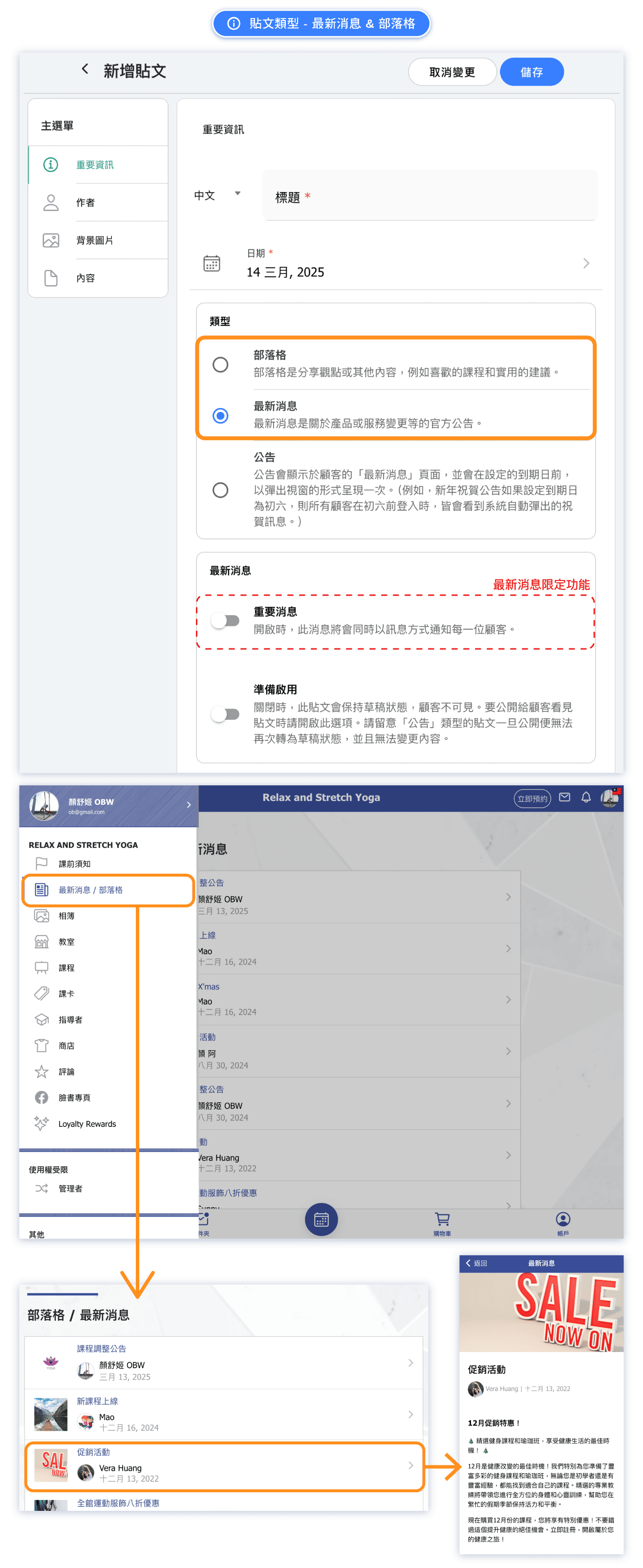
The News/Blog feature allows you to publish content directly to your booking platform. There are three types of posts, each designed for different purposes:
- News: Time-sensitive updates that can be sent as notifications to all customers
- Blog: Articles, tips, and content to engage customers and build your brand
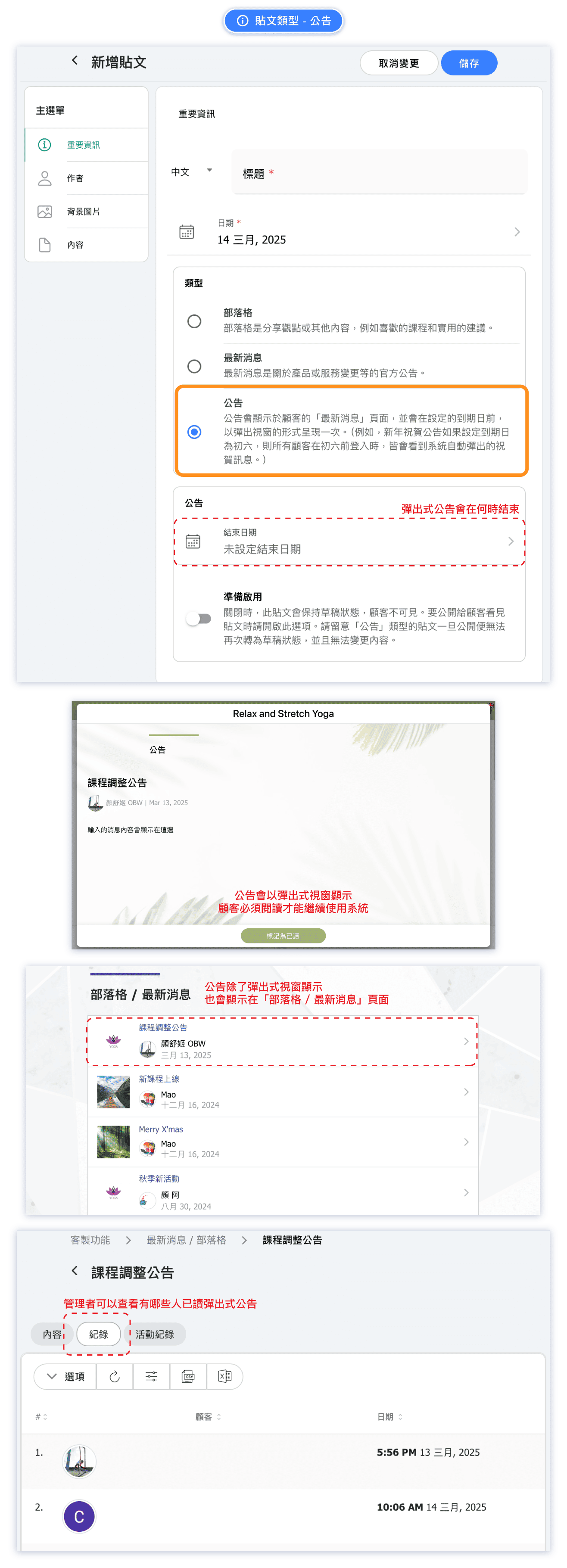
- Announcement: Important information displayed as a popup that customers must acknowledge
All posts appear in the News/Blog section of your customer-facing booking page, but each type has unique features that make it suitable for different situations.
When should I use a News post?
Use News when you have urgent or time-sensitive information that customers need to know right away. News posts can optionally send a notification message to all customers.
Best for:
- Schedule changes or class cancellations
- New class or service launches
- Limited-time promotions or flash sales
- Important operational updates
- Holiday hours or temporary closures
Key feature: When creating a News post, you can choose to send a push notification or message to all customers, ensuring they see your update immediately rather than waiting for them to check your page.
When should I use a Blog post?
Use Blog for content that builds your brand and keeps customers engaged over time. Blog posts are perfect for sharing expertise and creating a connection with your audience.
Best for:
- Wellness tips and health advice
- Instructor spotlights and team introductions
- Success stories and customer testimonials
- Industry insights and trends
- Behind-the-scenes content
- Seasonal content and themed articles
Key feature: Blog posts remain visible on your page for customers to browse at their leisure. They help establish you as an expert in your field and give customers a reason to keep coming back to your page.
When should I use an Announcement?
Use Announcement when you have critical information that customers must read and acknowledge. Announcements appear as a popup that customers must dismiss before continuing.
Best for:
- Policy changes (cancellation policy, booking rules)
- Terms and conditions updates
- Safety guidelines and studio rules
- COVID-19 or health protocols
- Price changes effective from a certain date
- Important notices requiring customer acknowledgment
Key feature: Unlike News and Blog posts that customers might scroll past, Announcements force customers to acknowledge the information by clicking to dismiss the popup. This ensures important updates are actually seen and read.
How do I create a new post?
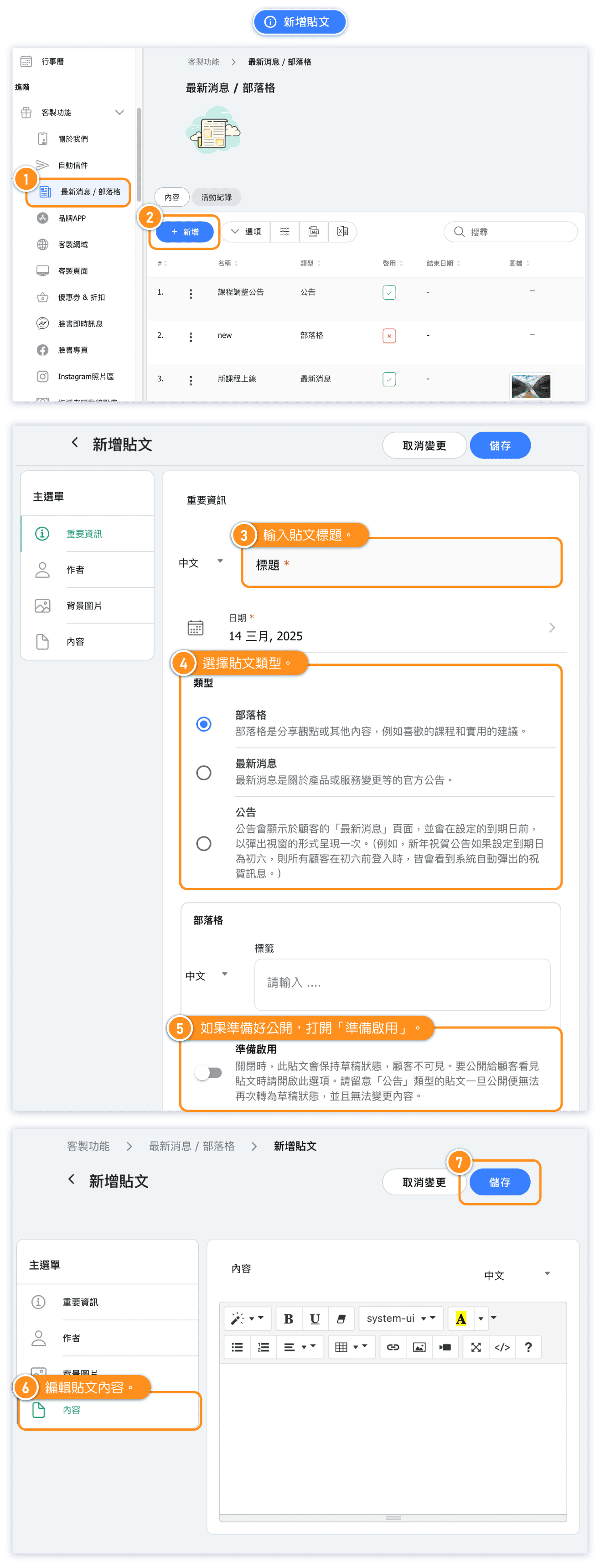
Follow these steps to create a News, Blog, or Announcement post:
- Go to Custom Features in the admin menu
- Click on News / Blog
- Click the + NEW button
- Fill in the Important Information:
- Title for your post
- Post type (News, Blog, or Announcement)
- Publish date and optional end date
- Add an Author (optional)
- Upload a Cover Photo to make your post visually appealing
- Write your Content using the rich text editor
- Click Save to publish
Which post type should I choose?
Here's a quick comparison to help you choose:
| Feature | News | Blog | Announcement |
|---|---|---|---|
| Best for | Urgent updates | Content marketing | Must-read info |
| Notification | Can send to all customers | No notification | No notification |
| Display | In news feed | In news feed | Popup window |
| Customer action | Optional reading | Optional reading | Must acknowledge |
Rule of thumb:
- Need customers to act quickly? → News with notification
- Building brand and sharing content? → Blog
- Policy or terms customers must accept? → Announcement



