
Steps to Change from a Points System to a Class Pass System
To do transition the pass unit from the points system to the per class system, follow these steps:
- Conversion of Charges.
- Adjust the prices and points of passes on the pass page.
- Adjust the points of all passes held by customers.
- After confirming that all passes held by customers have been adjusted, disable the "Point System" feature.
Please ensure that you complete steps 1 through 3 in sequence, then do 4.
—————————
↓ Before You Begin ↓
⛔ During the setup period to avoid class revenue or any financial data confusion and customer reservation issues, it is recommended that you "suspend bookings during the transition period" and inform customers to wait until the transition is completed before making reservations.提💡 Temporary Suspension of All Customer Bookings: Contact your sales representative to temporarily enable the custom feature "Pause Account " → "Suspend Bookings".
⛔Do not disable "Point System" until steps 1 through 3 are completed.
Reminder: The system cannot automatically switch the points billing ratio. When "Points Billing" is disabled, the billing method for all courses and passes will be initialized, changing from points to "per class." The number of classes used by customers holding passes will depend on the "number of classes booked." For example: A customer holds a 20-point pass that has been fully used [20/20], and they have booked 10 classes, each costing 2 points, using this pass. When "Points Billing" is disabled, the points value becomes irrelevant, and the billing unit changes to classes. Therefore, the customer has used 10 classes [10/20].
| Before Disabling Point System | After Disabling Point System | |
| This 20-point pass has been used for 10 classes. | 2 points per class | Per class |
| Pass Status (used / total) | 20/20 | 10/20 |
【1】Fee Conversion
Confirming Class Fee Structure
◼ Pages: "Courses", "Class Passes"
Example 1: For Aerial Yoga, each class costs 3 points. A class pass with 30 points is sold for $6,000, allowing access to 10 Aerial Yoga classes. Hence, the fee per Aerial Yoga class is $600.
Example 2: For Flow Yoga, each class costs 2 points. A class pass with 20 points is sold for $4,500, allowing access to 10 Flow Yoga classes. Hence, the fee per Flow Yoga class is $450.
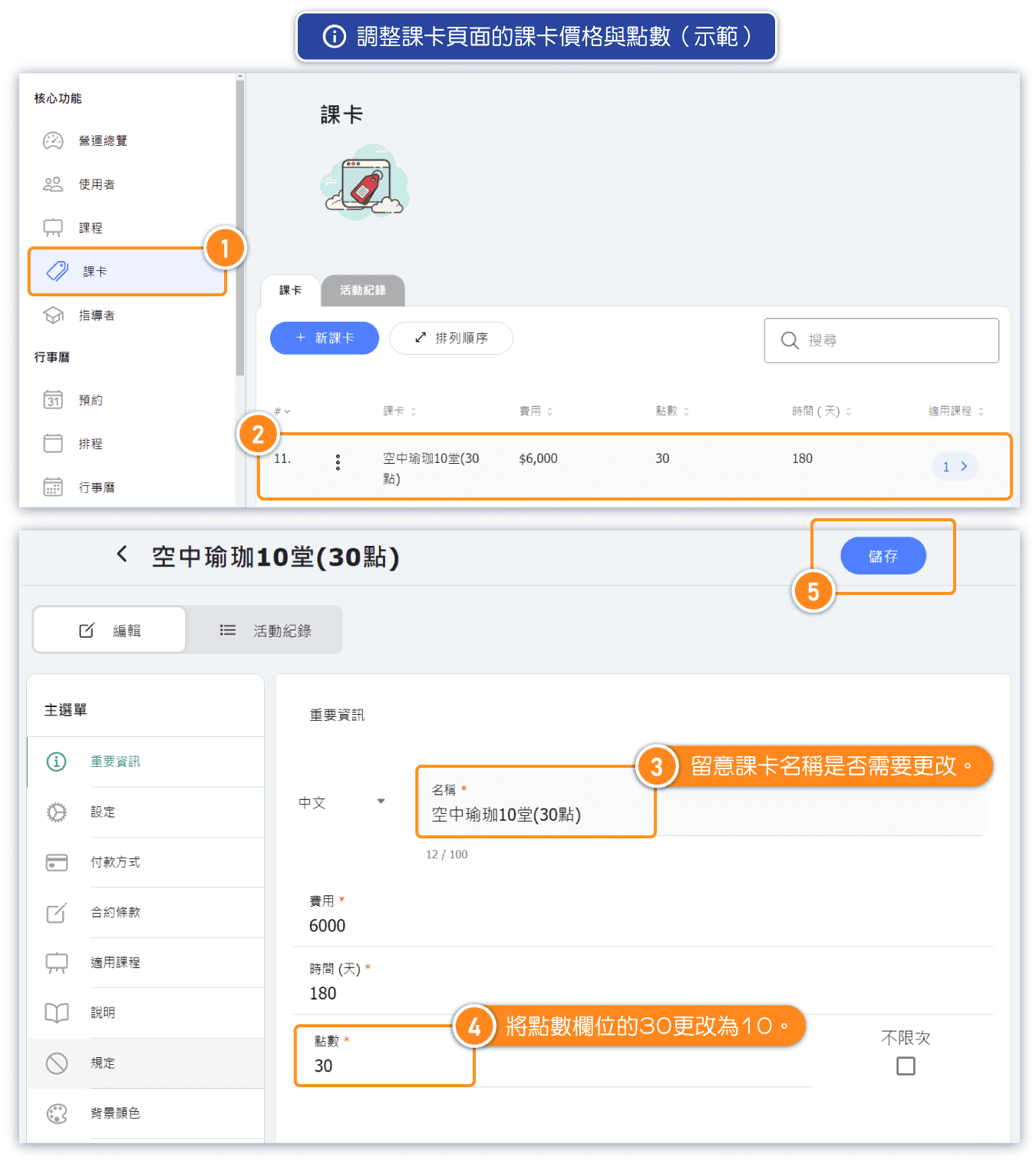
【2】Adjustment of Pass Page Price and Points
Update the existing passes' point values to correspond to the number of classes as determined in Step 1. For example, change the point value of the "Aerial Yoga 30 points" pass to 10.
◼ Page: "Class Passes"
🔔 Note: About accepted class
If after the conversion, existing passes no longer fully match the originally set class, it is recommended to create new passes and mark the old ones as "Archived" to remove them from the customer page. (If the old passes still apply to the newly set class, there's no need to create new ones.)
Adjusting the "Unit (point / class)" and "Price" fields on the pass page does not affect existing passes held by customers. Please consider whether there is a need to adjust the names of passes. Use the "Archive" function to hide passes that are no longer in use from the customer page. Do not delete passes directly.
【3】Adjustment of Points for All Customers' Passes
To ensure financial consistency before and after the conversion, adjust the points of all sold passes (those held by all students) to correspond to the number of classes.
◼ Page: "Users"
—————————
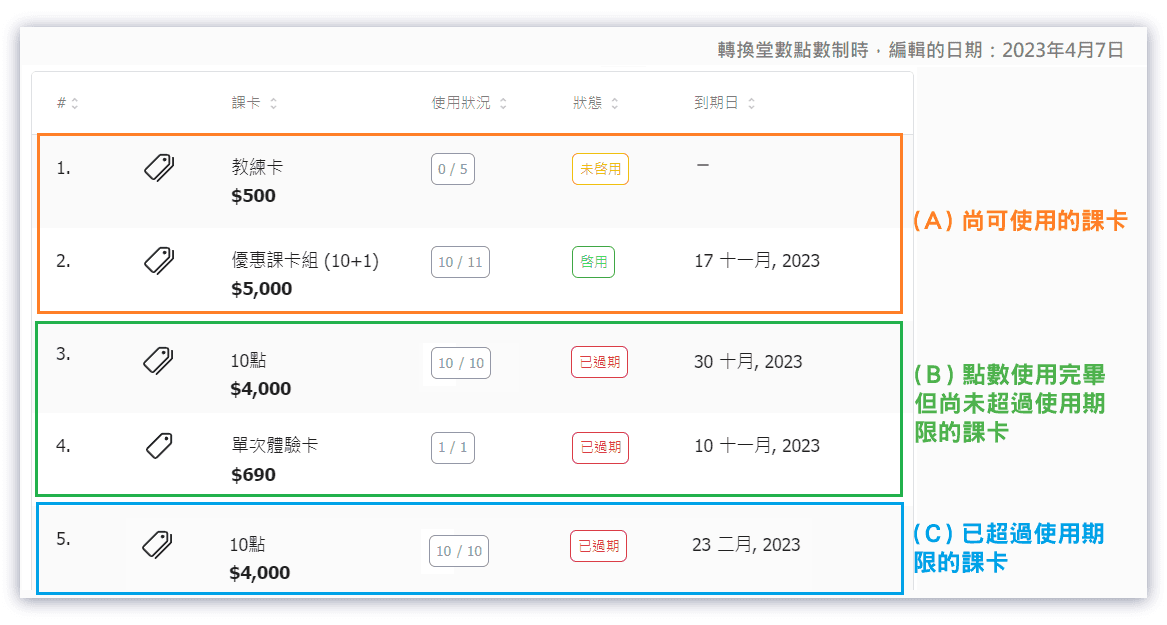
🔔 Note: If financial consistency is not a concern, adjustments are only needed for "(A) active passes" and "(B) passes with no points left but not yet expired" held by customers. "(C) Passes expiration dates have passed" no need to be adjusted.
Definitions:
(A) Active passes:Passes still have remaining points and not expired yet.
—————————
Adjusting (A) and (B) Passes:
Example
For example, a customer holds two passes:
(A) Flow Yoga 10 Classes (20 points)
(B) Aerial Yoga 10 Classes (30 points)
(A) Active Passes: "Flow Yoga 10 Classes (20 points)"
This pass has been used for Flow Yoga (1 class, 2 points), totaling 4 classes, leaving 6 remaining.
Point Status: 8/20 (Used / total)
Pass Status: Not Expired
▶ Method 1: Change the point value of the "Flow Yoga 10 Classes" pass from 20 to 10.
▶ Method 2: If the old class pass is no longer valid for the previous courses, use Method 2. Change the point value of the "Flow Yoga 10 Classes" pass from 20 to 4, and issue a new "6 Classes Pass" to the customer.
(B) Passes with Expired Points: "Aerial Yoga 10 Classes (30 Points)"
This pass has been used for Aerial Yoga (1 class, 3 points), totaling 10 classes.
Credit Status: 30/30 ( Used/Total )
Pass Status: Not Expired
▶ Change the credit value of the "Aerial Yoga 10 Classes" pass from 30 to 10. (As this pass has already been used for 10 classes)
—————————
Adjusting (C) Expired Passes:
Example
For example, a customer holds an expired class pass:
"Expired Aerial Yoga 10 Classes (30 points)"
This pass has been used for Aerial Yoga (1 class, 3 points), totaling 8 classes.
Credit Status: 24/30 ( Used/Total )
Pass Status: Expired
▶ Change the credit value of the "Expired Aerial Yoga 10 Classes" pass from 30 to 10.
Explanation: To ensure financial consistency before and after the conversion, passes need to be adjusted to reflect the new class-based fee structure. For instance, a pass originally intended for 10 classes needs its points changed from 30 to 10. (After all passes have been adjusted, closing the credit-based billing will revert course fees to deducting one class per reservation.)


