
When should I use batch pass extension?
Batch pass extension is useful when you need to compensate multiple students for a missed class. Common scenarios include:
- Instructor absence: The teacher calls in sick or has an emergency
- Unexpected closure: Weather, power outage, or facility issues
- Holiday cancellation: Class cancelled for a public holiday
- Schedule change: Class moved to a different time that some students can't attend
Instead of extending each student's pass one by one, you can select all affected students and add extra days to their passes in one action.
How do I batch extend passes for a class?
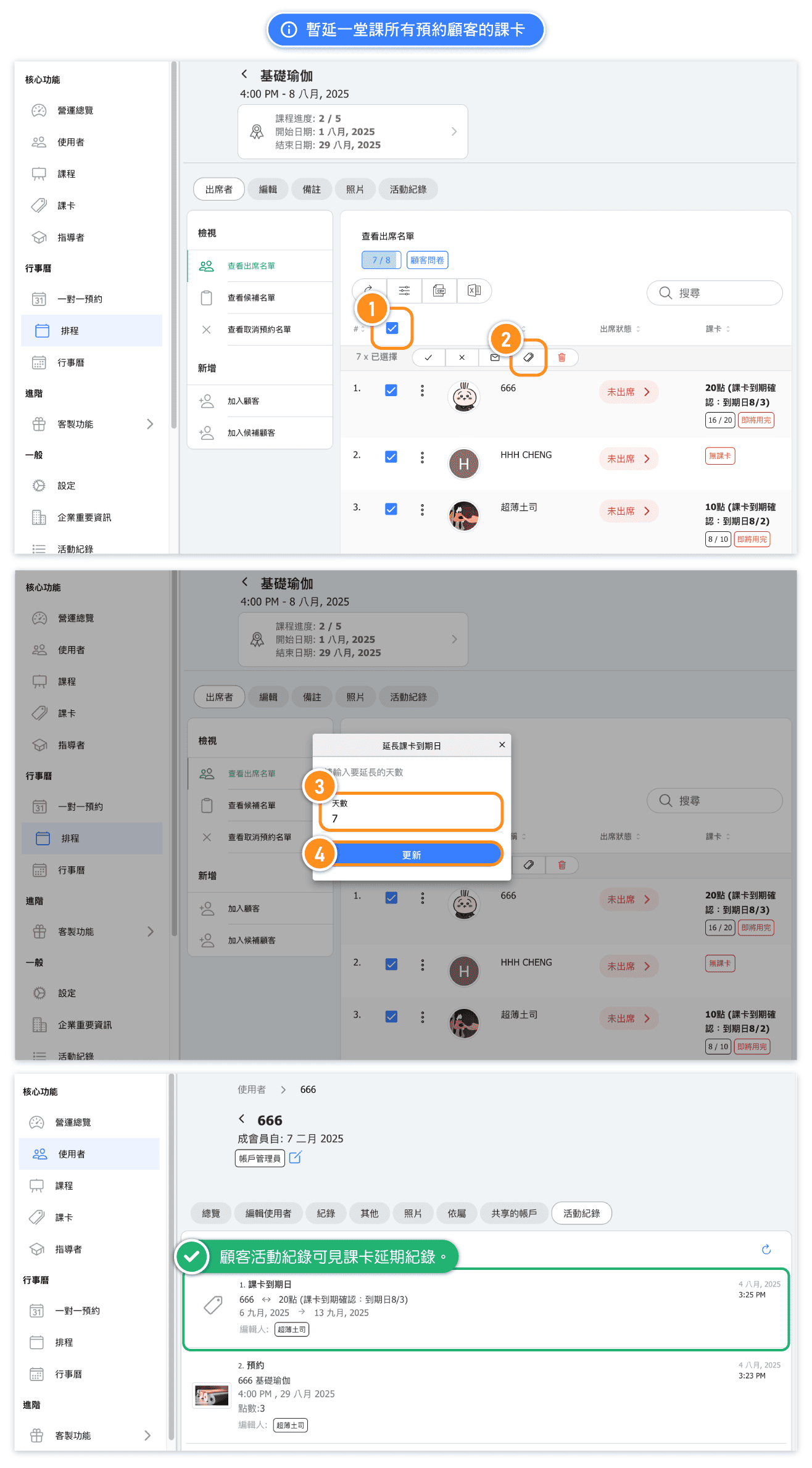
Follow these steps to extend pass validity for all students in a class:
- Go to Calendar in the admin menu
- Find and click on the class that was cancelled or affected
- Click the Attendees tab to see all booked students
- Select students by clicking the checkbox next to each name, or click the checkbox in the header row to select all
- Once students are selected, click the Pass icon in the action bar
- Enter the number of extra days to add to their pass validity
- Click Confirm to apply the extension to all selected students
How many days should I extend?
The number of days to extend depends on your business policy and the situation:
- Single class cancellation: Typically 7 days (one week) gives students time to rebook the next available class
- Multiple cancellations: Add 7 days for each cancelled class
- Extended closure: Match the number of days you were closed
Example: If a student's pass expires on January 15 and you extend by 7 days, their new expiry date will be January 22.
Tip: Be consistent with your extension policy so students know what to expect when classes are cancelled.
What if students have different pass types?
When you batch extend passes, the system will apply the extension to whatever pass each student used to book the class. This works even if students have different pass types:
- Students with monthly passes get their monthly pass extended
- Students with class packages get their package validity extended
- Students with annual passes get their annual pass extended
The extension is applied to the specific pass that was used for the booking, not to all passes a student may own.
Can I extend passes for just some students?
Yes! You have full control over which students receive the extension:
- Select all: Click the checkbox in the header row to select everyone
- Select specific students: Click individual checkboxes next to the students you want to extend
- Deselect students: If you selected all, you can uncheck specific students to exclude them
This flexibility is useful when:
- Some students have already been compensated
- Some students cancelled before the class was cancelled
- You want to apply different extension amounts to different groups
Will students be notified of the extension?
The batch extension updates pass validity dates in the system, but does not automatically send notifications to students. We recommend:
- Sending a message to affected students explaining the cancellation and extension
- Using the bulk messaging feature to notify all students at once
- Posting an announcement if your system has a news or notice feature
Clear communication helps maintain good customer relationships and ensures students know their passes have been extended.


