
How do I connect my Google Business account?
Follow these steps to connect your Google Business Profile:
- Go to Custom Features in the admin menu
- Find Google Business under the Social Media section
- Click to enable the feature
- Click Connect next to Google Account
- Sign in with the Google account that manages your business profile
- Select your business location from the list (if you have multiple locations)
- Your reviews will automatically appear on your booking page
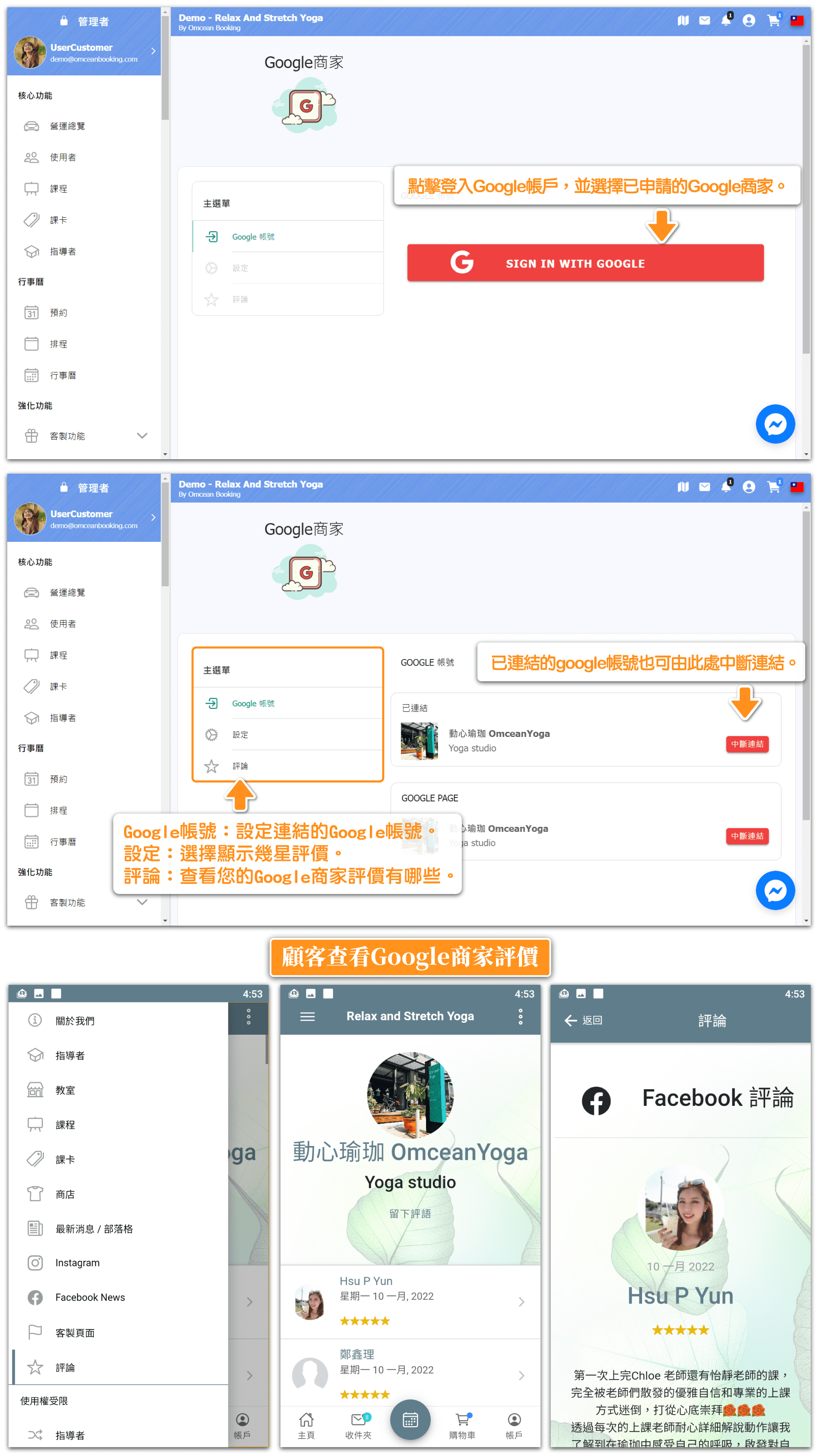
Where will my Google reviews appear?
Once connected, your Google reviews will be displayed on your customer-facing booking homepage. Customers will see:
- Your overall star rating (e.g., 4.8 out of 5 stars)
- The total number of reviews
- Individual review comments from customers
- Reviewer names and profile photos
This social proof helps potential customers feel confident about booking with your business.
What if I don't have a Google Business Profile yet?
If you don't have a Google Business Profile, you'll need to create one first before using this feature. Here's how:
- Go to business.google.com
- Sign in with your Google account
- Follow the prompts to add your business information
- Verify your business (Google may send a postcard or call to verify)
- Once verified, you can connect it to your booking system
Creating a Google Business Profile is free and also helps your business appear in Google Maps and local search results.
Can I choose which reviews to display?
The Google Business integration automatically syncs your reviews from Google. You cannot selectively hide individual reviews, as this ensures authenticity and builds genuine trust with customers.
However, the system typically displays your most recent and most helpful reviews. If you have concerns about a specific review on Google, you can:
- Respond to the review professionally on Google
- Report reviews that violate Google's policies
- Focus on encouraging happy customers to leave positive reviews
How do I disconnect my Google Business account?
If you need to disconnect your Google Business account:
- Go to Custom Features → Google Business
- Click the Disconnect button next to your connected Google Page
- Your reviews will no longer appear on your booking page
You can reconnect at any time by following the connection steps again.



