
What is monthly class release?
Monthly class release is a scheduling feature that automatically makes next month's classes available for booking on a specific date and time you choose. Instead of classes gradually appearing as you approach each date, all of next month's classes become bookable at once.
Benefits of monthly release:
- Fair access: All customers have an equal chance to book popular classes
- Build excitement: Creates anticipation around the monthly release
- Predictable schedule: Customers know exactly when to check for new classes
- Reduced admin work: Set it once and the system handles it automatically
Example: Release next month's classes at 9:00 PM on the 25th of each month. On January 25 at 9 PM, all February classes become available for booking.
How do I set up monthly class release?
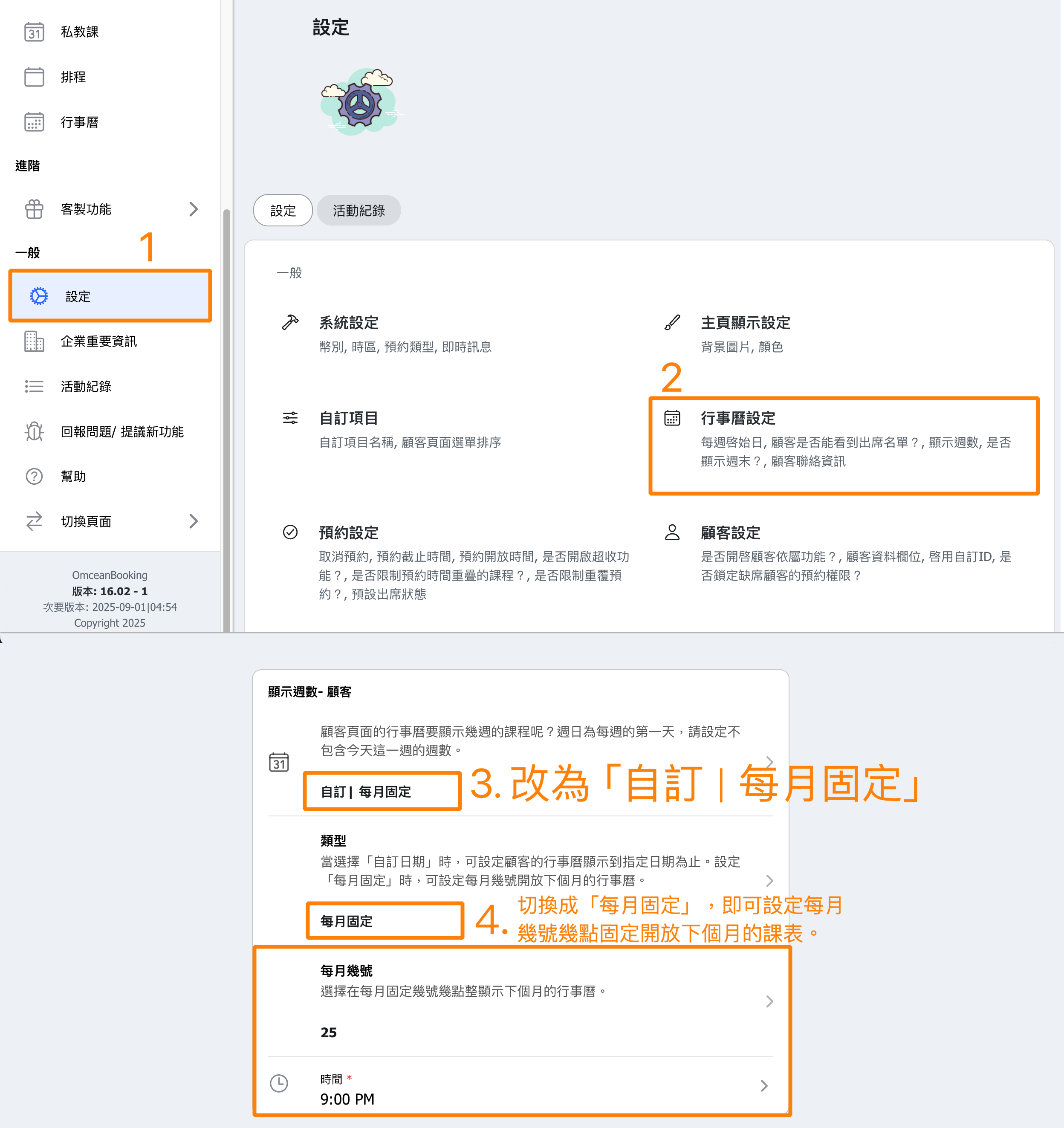
Follow these steps to configure monthly class release:
- Go to Settings in the admin menu
- Click on Calendar settings
- Find the Weeks in Future - Customers setting
- Select the Monthly Release option
- Choose the Day of Month (e.g., 25th)
- Set the Time for the release (e.g., 9:00 PM)
- Click Save to apply your settings
What's the difference between weekly and monthly release?
You can choose how far in advance customers can see and book classes:
Weeks in Future (Rolling):
- Classes become visible a set number of weeks ahead
- New classes appear continuously as time passes
- Example: "3 weeks" means customers always see the next 3 weeks of classes
Monthly Release (Fixed Date):
- All of next month's classes release at once
- Happens on the same date/time each month
- Creates a "drop" moment where new classes become available
Choose monthly release if:
- You have high-demand classes that fill up quickly
- You want to create excitement around new class availability
- Your customers prefer knowing exactly when to book
What date and time should I choose?
Consider these factors when choosing your release date and time:
Choosing the day:
- 25th-28th: Popular choices - gives customers a few days before the month starts
- 1st of the month: Simple to remember, but may feel rushed
- Last day of month: Gives maximum advance notice
Choosing the time:
- Evening (7-9 PM): Most customers are free to book
- Morning (9 AM): Good for business hours
- Avoid midnight: May cause confusion about which day
Tip: Survey your customers or check when they're most active on your booking system to find the best time.
How do I notify customers about the release?
Help your customers prepare for the monthly release:
- Post on social media: Remind followers when new classes will be available
- Send an email: Use the messaging feature to notify customers a day before
- Add to your website: Display the release schedule prominently
- In-studio signage: Post reminders at your location
Example message: "Next month's classes open for booking on [date] at [time]! Mark your calendars and be ready to secure your spot in popular classes."
Consistent communication helps customers plan and reduces inquiries about class availability.
Can I change or disable monthly release?
Yes, you can modify your release settings at any time:
To change the date/time:
- Go to Settings → Calendar
- Click on Weeks in Future - Customers
- Update the day and/or time
- Click Save
To switch back to rolling weeks:
- Go to the same settings
- Select a number of weeks instead of monthly release
- Click Save
Note: Changes take effect immediately. If you're close to a release date, consider timing your change carefully to avoid confusion.


