
What is the difference between "Expired" and "Pass full" status?
The system distinguishes between two types of inactive passes:
- Expired: Passes where the expiration date has passed, regardless of remaining credits
- Pass full (fully used): Passes where all credits have been used, but the expiration date hasn't been reached yet
This distinction helps you identify customers who actively use their passes versus those who let them expire unused.
Where can I find passes that are used up or expired?
Navigate to Dashboard > Passes > Expired to view all inactive passes.
In this view, you'll see passes with both "Expired" and "Pass full" statuses. By default, the system shows passes that expired or were fully used within the past 7 days.
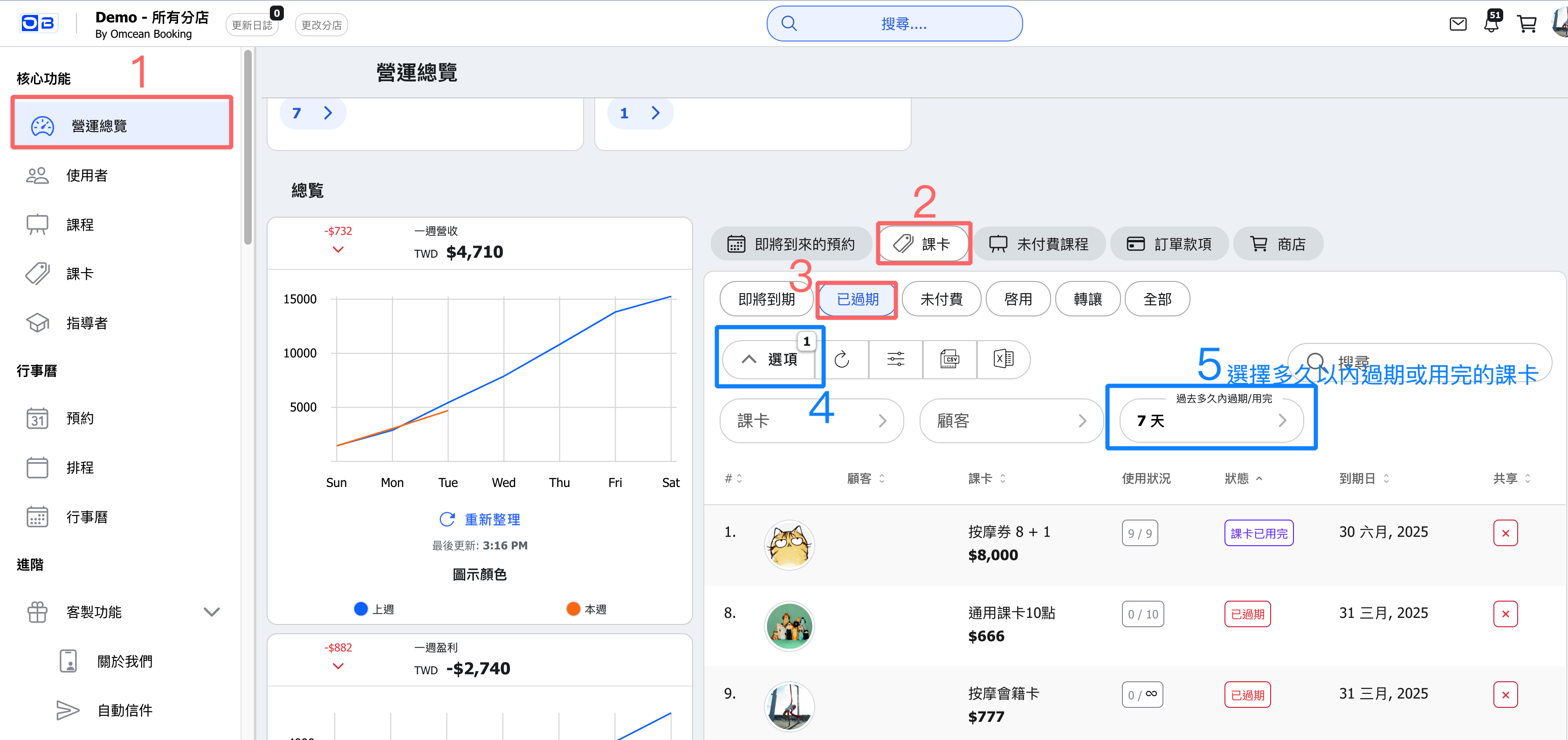
How do I adjust the time filter to see more passes?
To see passes beyond the default 7-day window:
- Look for the "Expired in last" filter at the top of the list
- Change the value to your desired time range (e.g., 30 days, 60 days, 90 days)
- The list will automatically update to show passes within that period
Example: Setting the filter to 30 days will show:
- All passes with expiration dates within the past 30 days ("Expired" status)
- All passes fully used within the past 30 days that hadn't yet expired ("Pass full" status)
Why is this information useful?
Tracking fully used passes separately from expired ones provides valuable business insights:
- Identify active customers: Customers who use all their credits are engaged and may be ready to purchase again
- Upsell opportunities: Reach out to "Pass full" customers with renewal offers while they're still active
- Usage patterns: Understand how quickly customers use their passes to optimize pricing and validity periods
- Reduce waste: Identify customers who let passes expire and consider offering reminders or shorter validity options
Frequently asked questions
Q: Can I export this list of passes?
A: Yes, you can typically export the filtered list using the export function in your admin panel.
Q: Can I reactivate a fully used pass?
A: Yes, you can add more credits to an existing pass through the pass management interface.
Q: Why don't I see some passes I expected?
A: Check your time filter setting. Passes outside the selected date range won't appear in the list.


