
What Are Coupons, Discounts, and Referral Codes?
When businesses want to drive customer spending through promotions or gifts, they can leverage the Coupons & Discounts feature to create a variety of marketing campaigns. This tool supports commonly used promotional models, including:
Discounts
Apply a fixed amount or percentage discount to selected membership passes. The system automatically applies the discount at checkout.
Coupons
Provide customers with a unique code that, when entered at checkout, applies a discount (percentage or fixed amount) to eligible passes or offers a gift item.
Giveaway Coupons
A type of coupon that allows customers to choose a free item from a predefined list after purchasing specific passes. For example: Buy a pass and receive a free yoga mat. Buy-one-get-one-free promotions can also be configured here.
Referral Codes (Available on 16.02 version!)
Customers can generate their own referral codes and share them with others. When someone uses the referral code and completes a purchase, the referrer earns reward credits, which can be redeemed toward future purchases.
Reward is a virtual amount automatically granted to customers based on their spending. This credit is stored in the customer's account and can be redeemed when purchasing eligible class passes or products during future purchases.
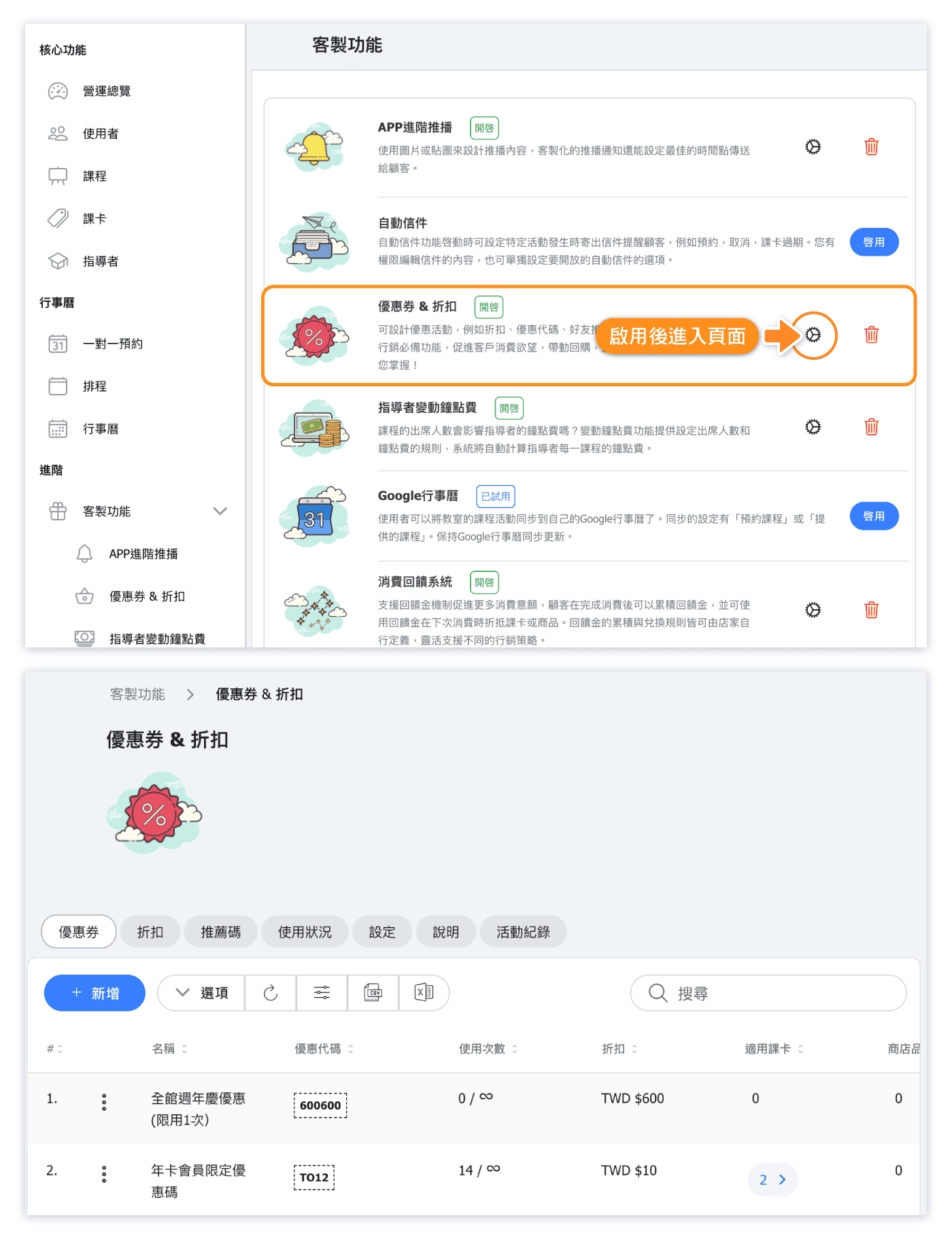
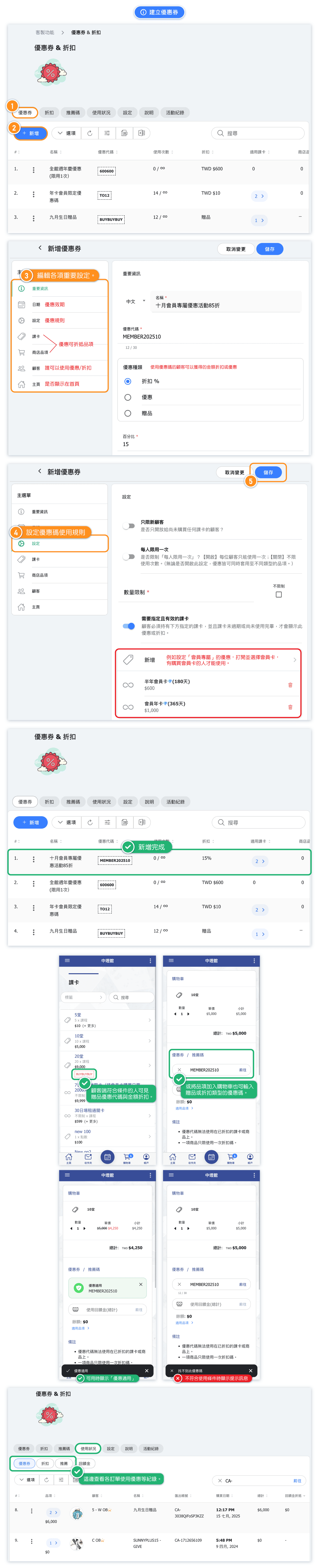
Create a Coupon or Discount
Tips for Use:
1. If a discount or coupon is only intended to be applied by staff when adding passes in the admin, disable the "All Customers" option under the 'Customer' setting in menu.2. Giftaway type coupons can be used in combination with discounts. However, price discount type coupons cannot be stacked, as discounts cannot be applied multiple times.
Note: The following two features are expected to be released in the 16.02~16.03 update:
1. Allow customers having specific passes to use discounts/coupons/referral codes (coming soon).2. Restrict discounts/coupons/referral codes to specific customers (coming soon).
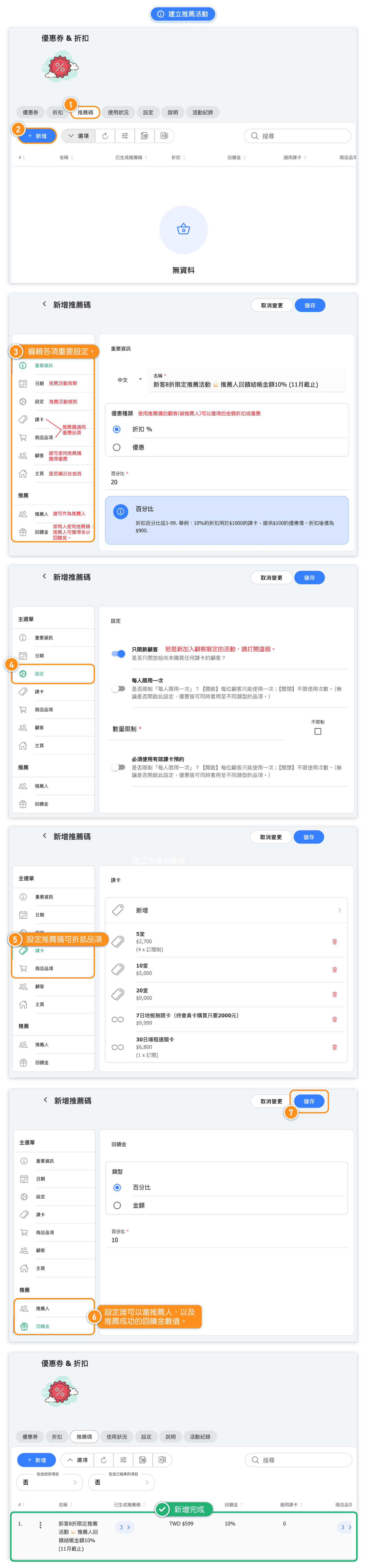
Create a Referral Event
*The corresponding feature editing page has been released early in version 16.02 of the system. The current web version is 16.02, and the feature mechanism has been applied to systems version 16.01 and above. The editing page is expected to be visible in the app starting from the next update version 16.02.
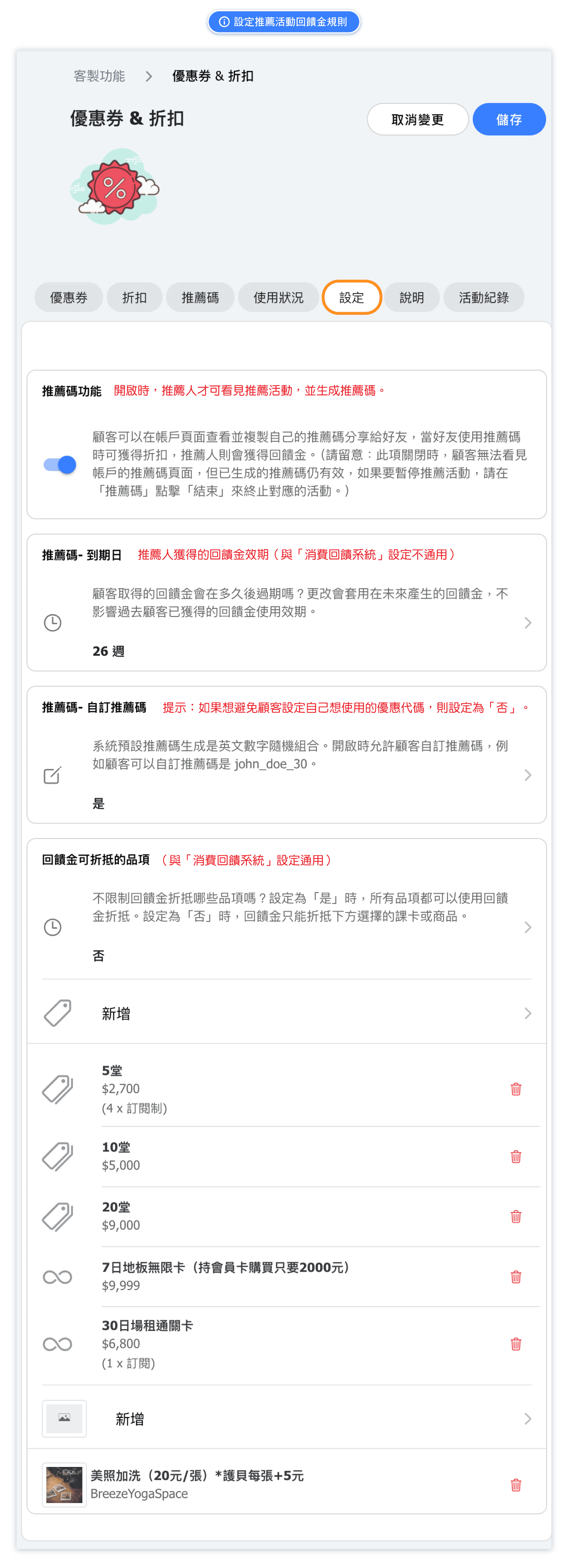
Set Rules for Referral and Eligible Items
Reminder:- The loyalty rewards are calculated based on the discounted amount.For example, if a pass is priced at NT$1,000 with a 10% discount and a 5% loyalty reward rate, the rewards earned will be: 1,000 × 0.9 × 0.05 = NT$45.
- The setting for "Reward items" in the Loyalty System feature is shared with the setting for redemption of referral rewards on Coupons & Discounts.
- The expiration date setting for loyalty rewards earned from purchases is not shared with the expiration setting for referral rewards.
- To configure the expiration for referral rewards, please go to "Coupons & Discounts".
- Loyalty rewards can be applied to deduct the order amount at checkout, and can be used for all or selected passes or shop items.
- (This setting is shared with the "Reward items" setting under "Coupons & Discounts".)
- The actual eligible items for rewards redemption may vary based on each studio's settings.
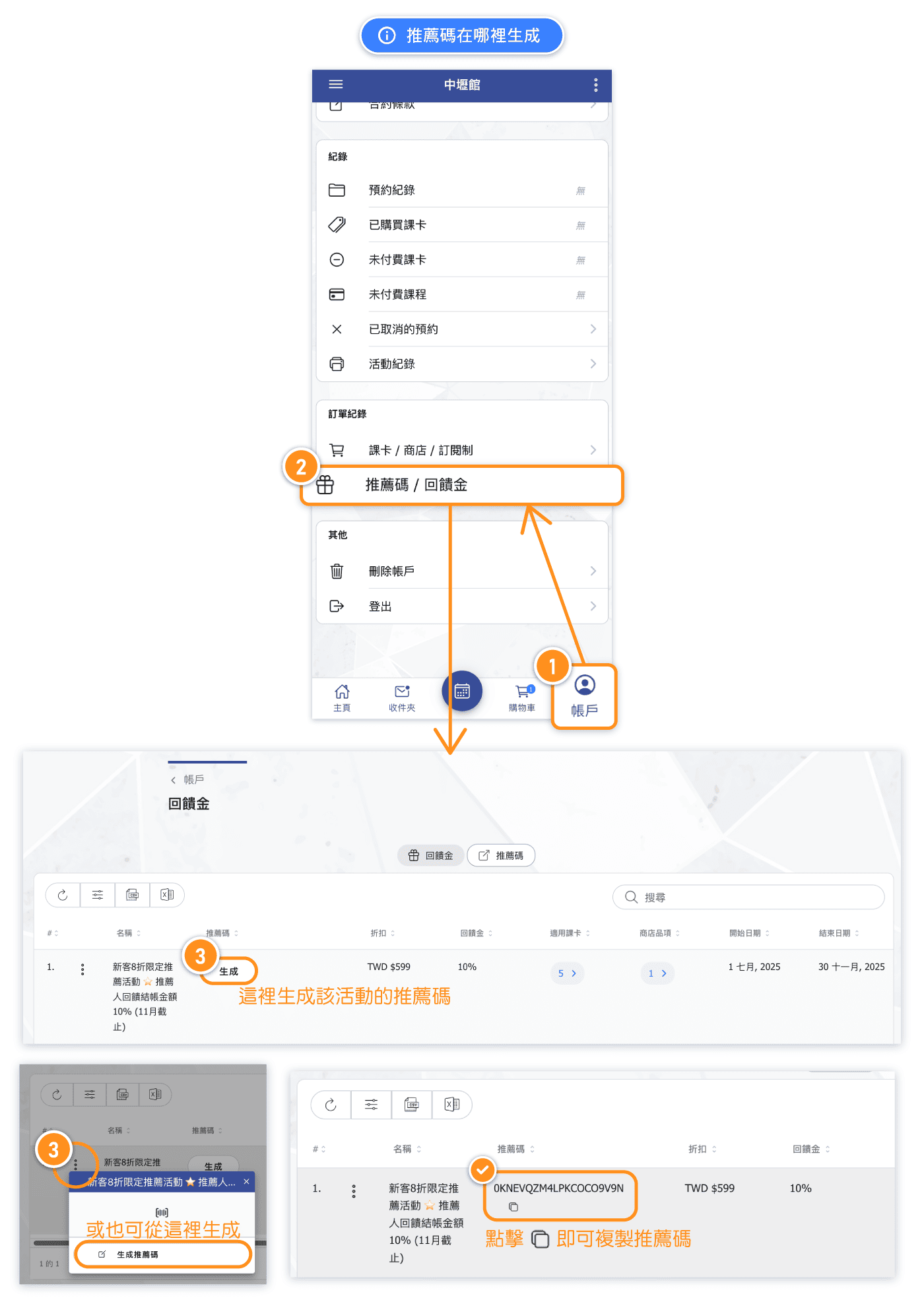
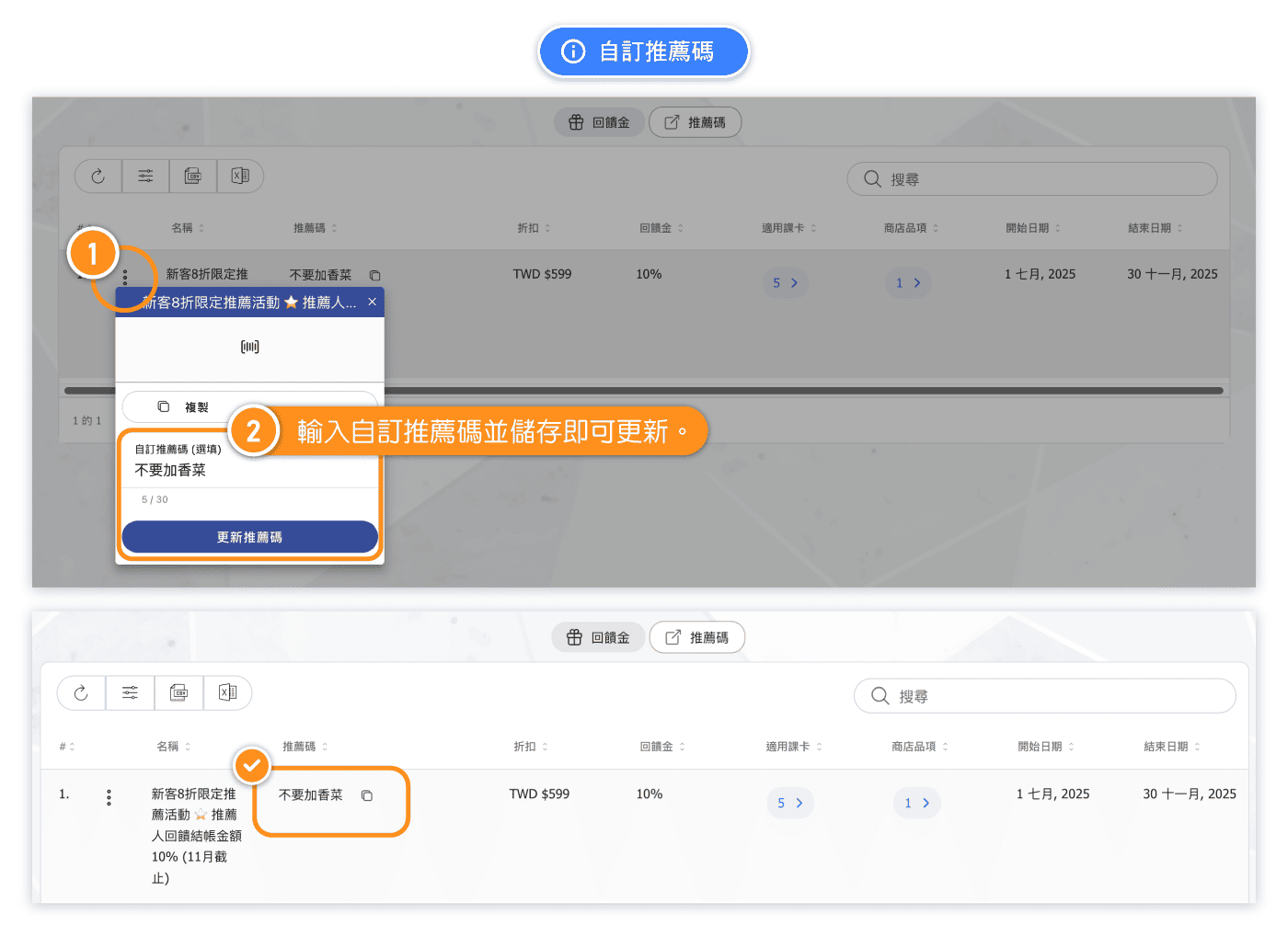
Where Are Referral Codes Generated? Can Customer Customize Their Code?
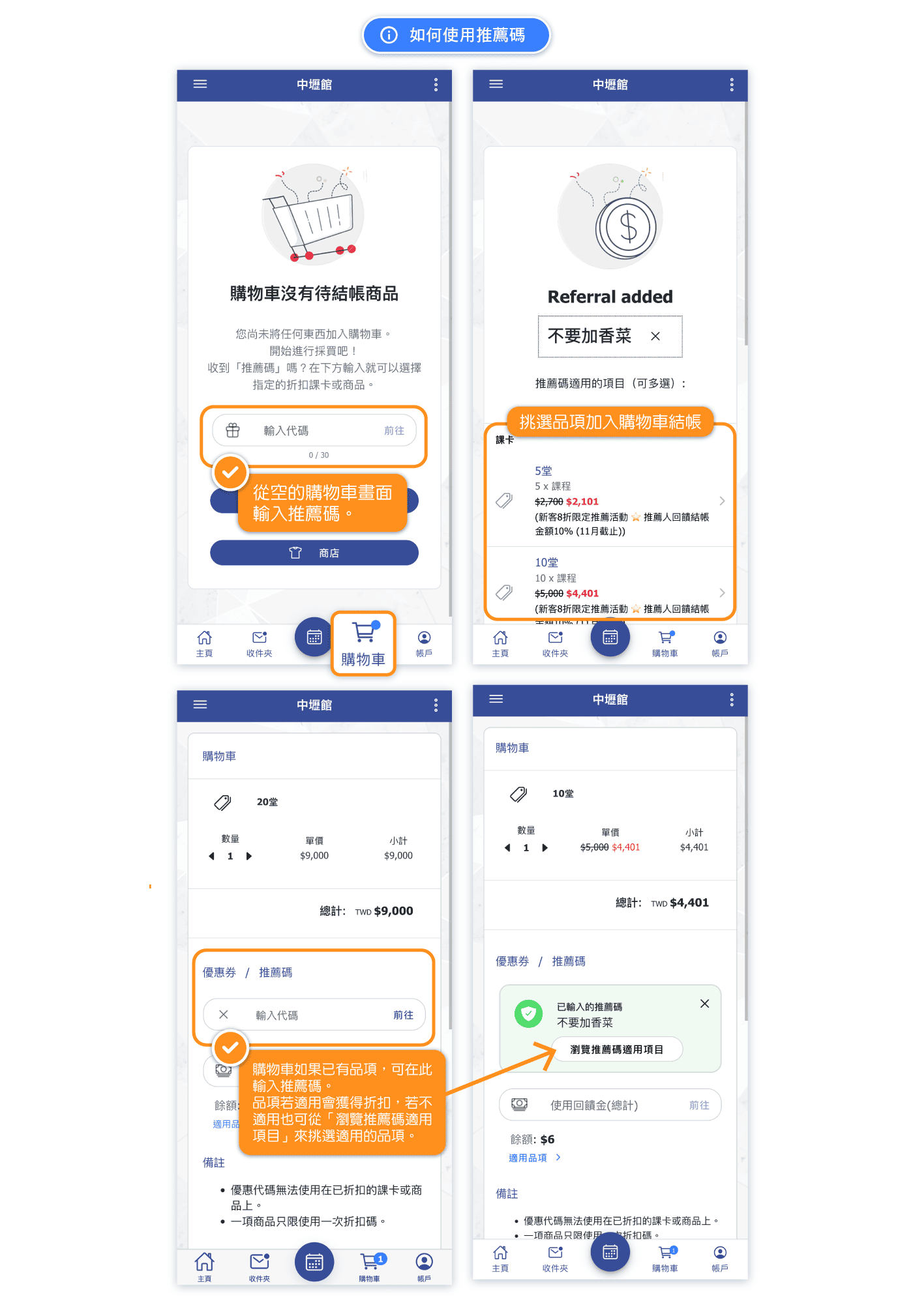
How to Use a Referral Code?
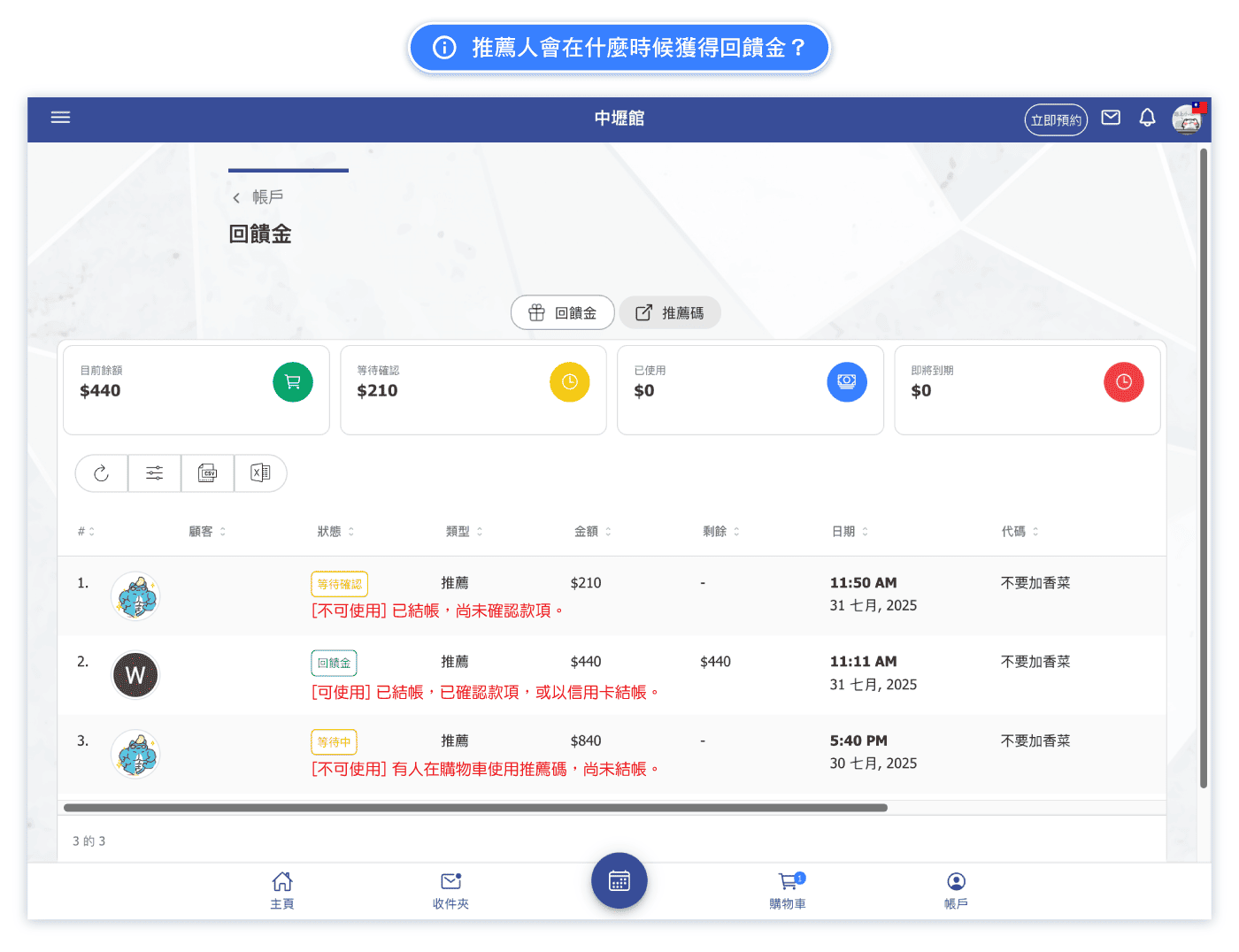
When Does the Referrer Receive the Reward?
How to Use Rewards?
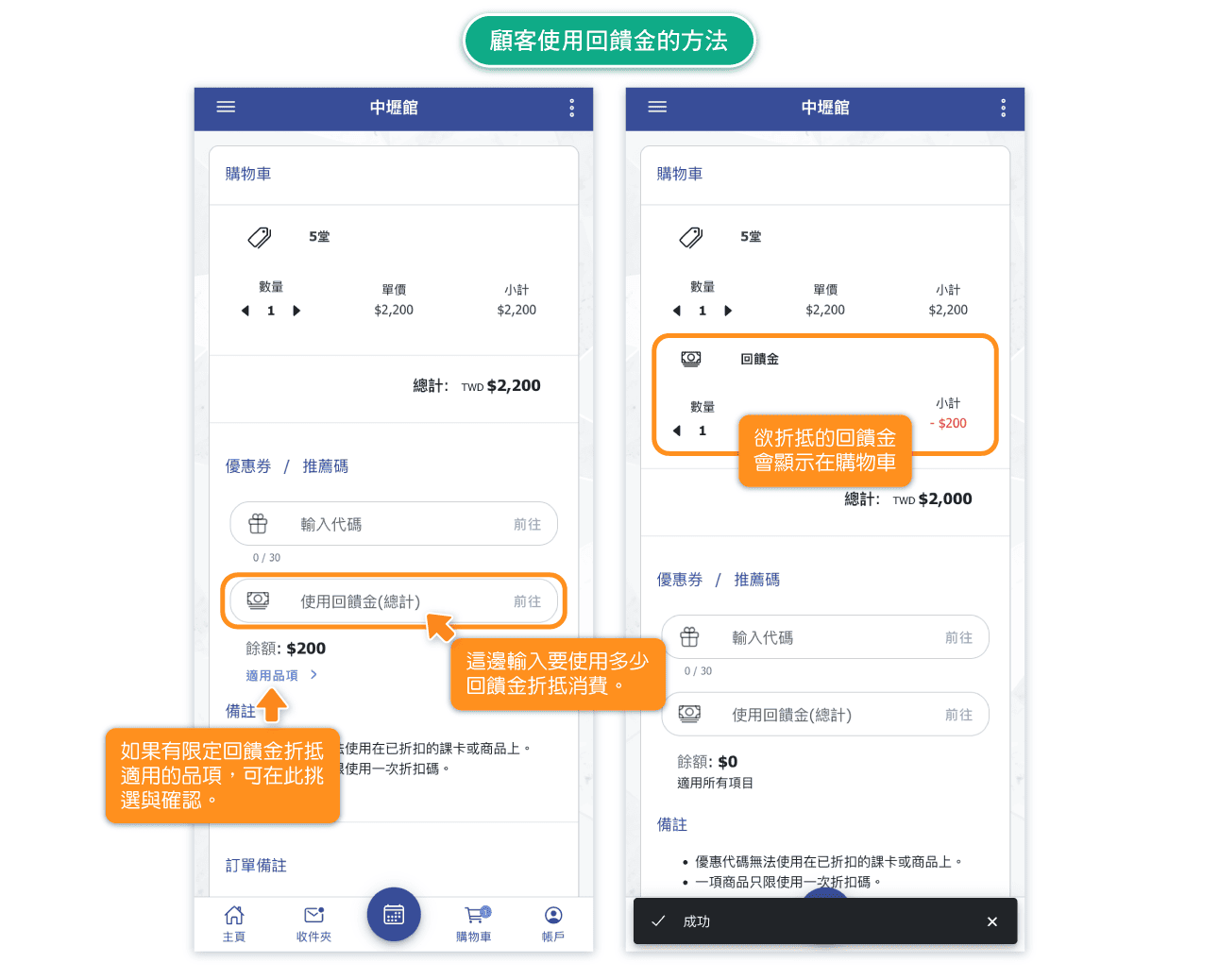
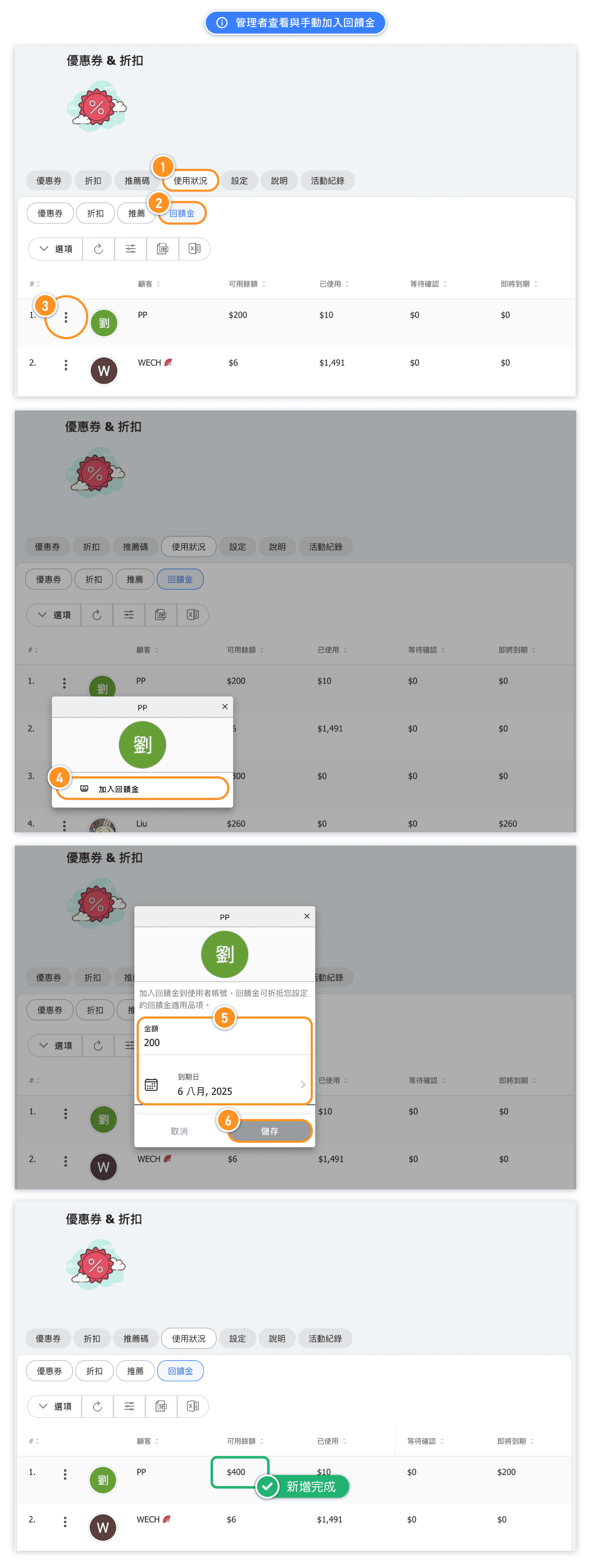
Admin View & Manual Add Rewards to Customer
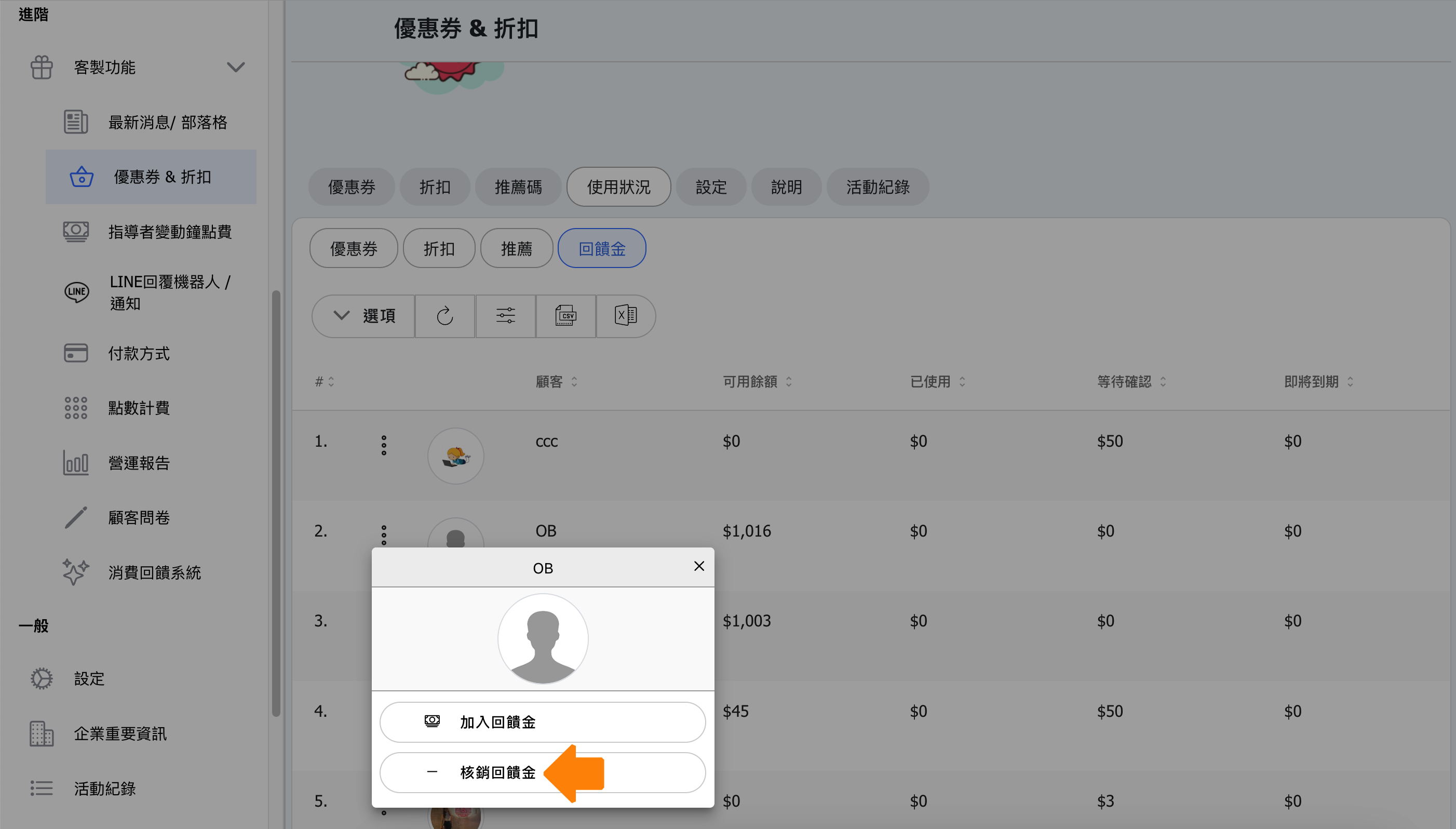
Manual Redemption of Rewards
When a student asks the studio to place an order on their behalf, you can manually redeem rewards through the admin page to ensure accurate accounting.
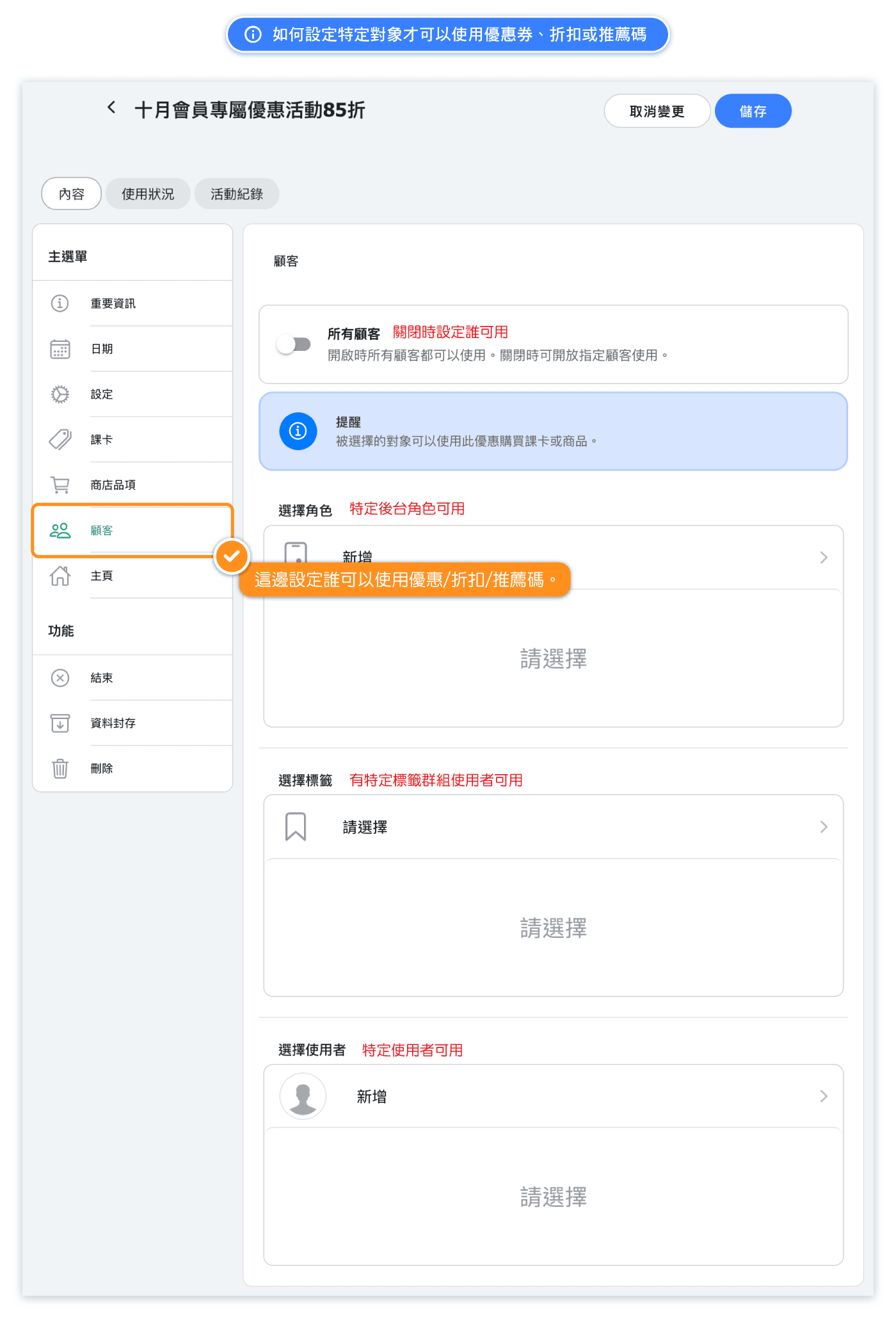
How to Restrict Coupons, Discounts, or Referral Codes to Specific Users?
*The corresponding feature editing page has been released early in version 16.02 of the system. The current web version is 16.02, and the feature mechanism has been applied to systems version 16.01 and above. The editing page is expected to be visible in the app starting from the next update version 16.02.
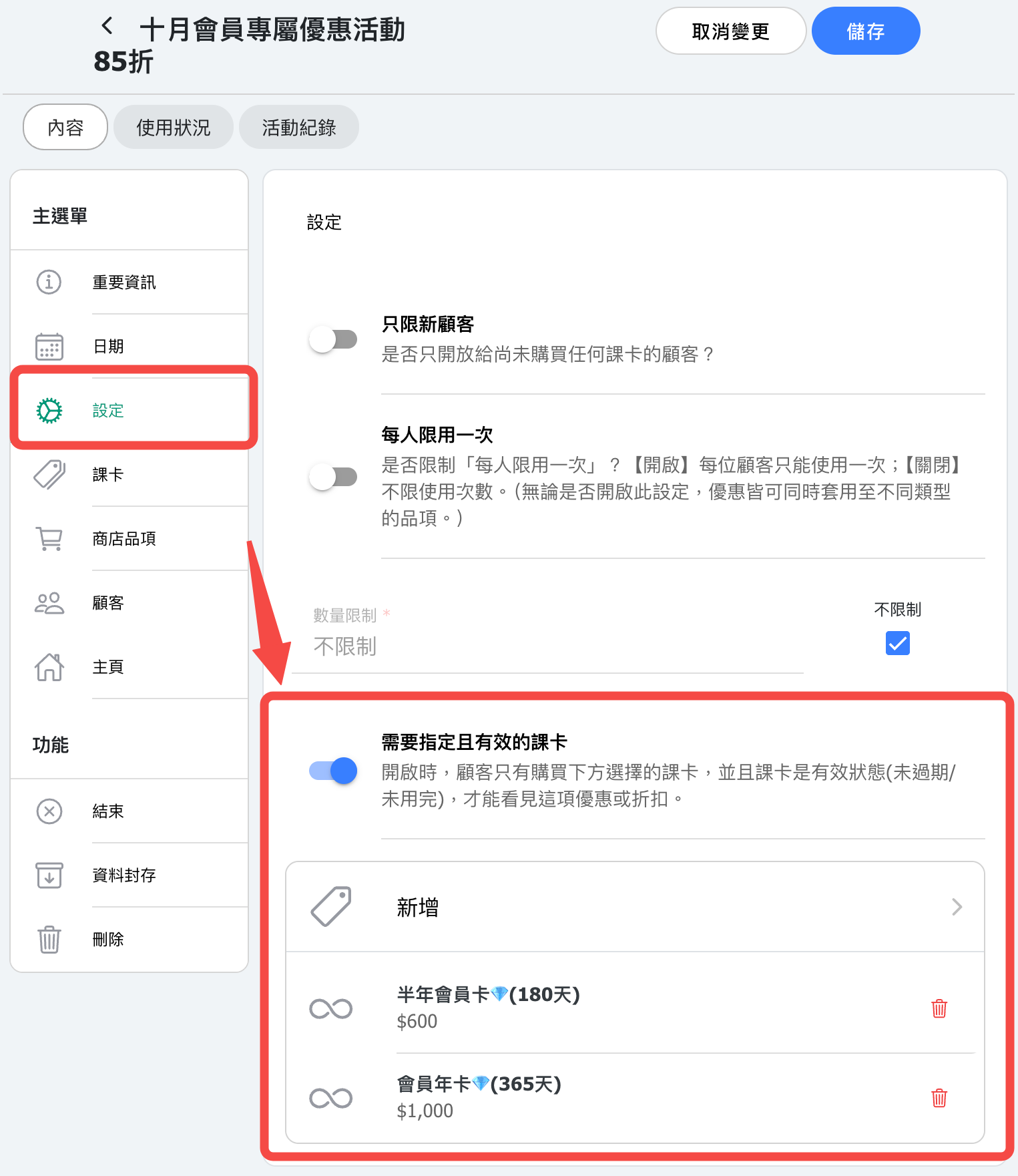
Can I Set Up Member-exclusive Offers?
Yes.
In coupon / discount / referral Settings, enable 'Active Pass Required', and select the member passes. Only members holding these passes will be able to view and use this offer or discount.
*The corresponding feature editing page has been released early in version 16.02 of the system. The current web version is 16.02, and the feature mechanism has been applied to systems version 16.01 and above. The editing page is expected to be visible in the app starting from the next update version 16.02.
FAQ 1: Will "Unpaid Passes" Still Apply Discounts or Coupons?
No. "Discount" and "price off type coupon" will NOT be applied to unpaid passes.Only giveaway type coupon CAN be applied to unpaid passes.
*Unpaid passes refer to passes manually added by an admin to a customer's account, with the 'Paid' toggle turned off.
FAQ 2: Can Discounts, Coupons, and Referral Codes Be Used Together?
Not allowed.Only 1 price discount or 1 coupon can be applied per cart.
Only 1 coupon or 1 referral code can be applied per cart.
Exception:
Only gift-type coupons can be combined with a discount.
Rewards - FAQ 1: Where Can Referrers Check Their Rewards Balance?
Rewards - FAQ 2: Do I Need to Inform Customers About the Referral Terms?
Yes. To avoid disputes and ensure compliance with regulations, it is important to clearly disclose the terms of use for loyalty reward on your website, contracts, and purchase pages.For example:
- Loyalty rewards can only be used to offset specific items and cannot be exchanged for cash or change.
- Loyalty rewards are non-transferable and non-refundable.
- Loyalty rewards cannot be considered as actual payment for invoice purposes. Invoices will be issued based on the amount after rewards are applied.
- Usage is subject to system-defined rules. Rewards cannot be used beyond the configured limits.
- Expired loyalty rewards cannot be used or refunded. Please pay attention to the expiration date.
Rewards - FAQ 3: Notes on Using Reward with Subscription-Based Passes
When allow earning rewards by purchasing subscription passes, please note:Customers will only receive rewards for the initial payment when purchasing a subscription pass. Subsequent recurring payments will not generate additional rewards.
When allowing reward credits to be used for subscription passes, please note:
During the subscription period, each recurring charge will follow the discounted amount from the first payment.
For example, if a subscription pass charges NT$5,000 monthly and the customer applies NT$500 in reward credits during the initial purchase, then NT$4,500 will be charged for each subsequent billing cycle.
Rewards - FAQ 4: What's the Difference Between "Loyalty Rewards" and "Referral Rewards"?
- Loyalty rewards from the Loyalty System are earned when purchasing specific class passes.
- Loyalty rewards from Referral Codes (Coupon % Discount feature) are awarded to the referrer when the referred customer enters the referral code at checkout.
- Both types of rewards can be used to redeem the same eligible items.
- Expiration settings are managed separately and do not apply universally across both types.
Rewards - FAQ 5: What's the Difference Between "Verifying" and "Pending" Statuses for Rewards?
"Verifying" means the customer has placed an order with payment option cash or bank transfer, but the payment hasn't been verified (confirmed) yet, so the reward stays in "Verifying" status for now."Pending" relates to rewards from referral codes (Coupons& Discounts feature). It means the customer entered the referral code at shopping cart, but hasn’t completed payment yet. The reward stays "Pending" while waiting for the customer to complete the purchase.
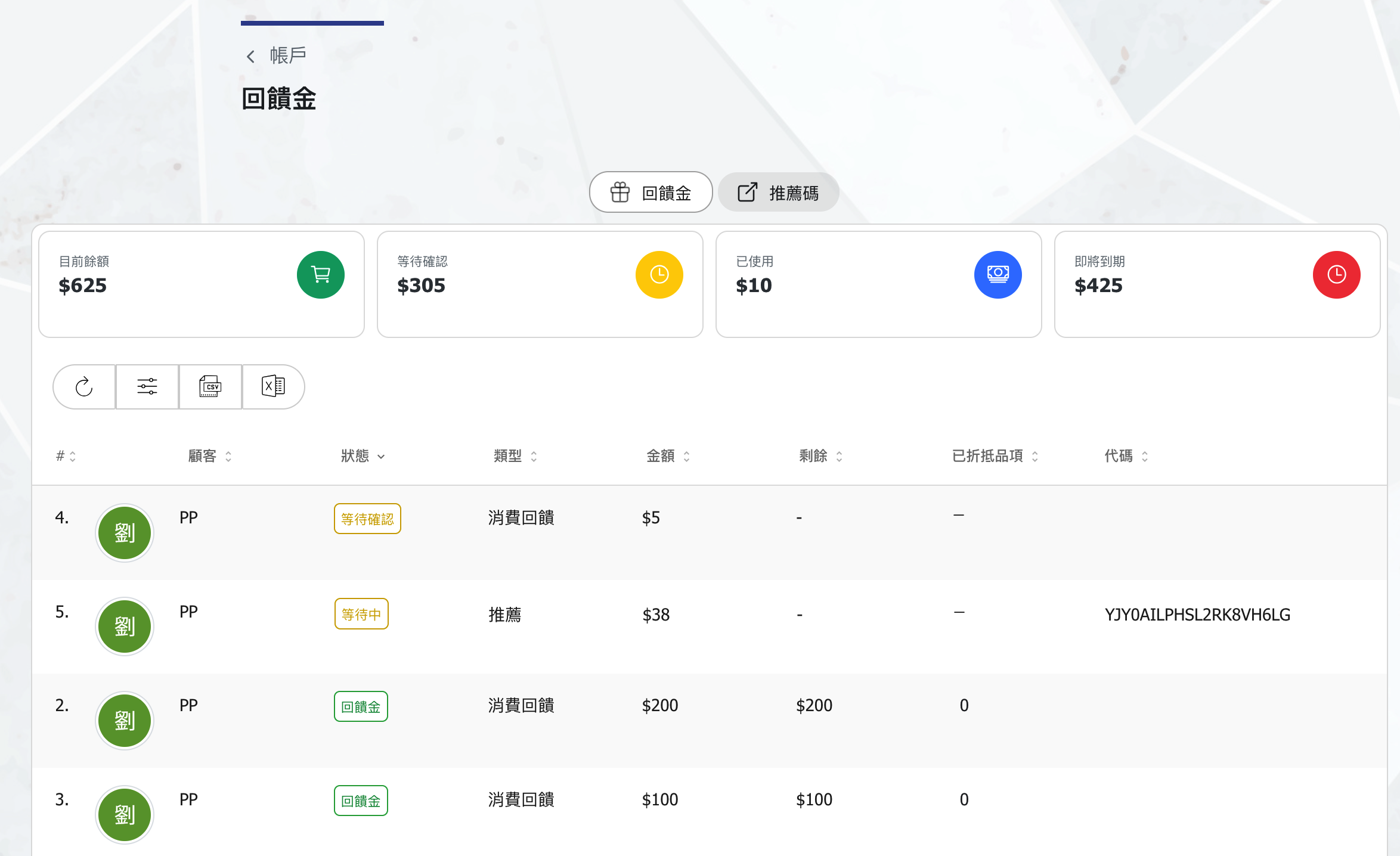
Rewards - FAQ 6: If an Order Is Deleted, Will the Used Rewards Be Returned?
Loyalty rewards that have been used will not be returned to the customer’s account, regardless of the order status.If a customer placed an incorrect order or if an order was accidentally deleted by an administrator, you may coordinate with the customer to determine the intended pass. You can then manually add it to the customer's account as an "unpaid pass", adjust the amount as needed, and allow the customer to complete payment accordingly. You can also manually add reward credits to a customer's account.


