Otter Music Studio × OmceanBooking | Yangqin & Kids' Percussion Class Bookings

by Sarah Chen
· 11 min read
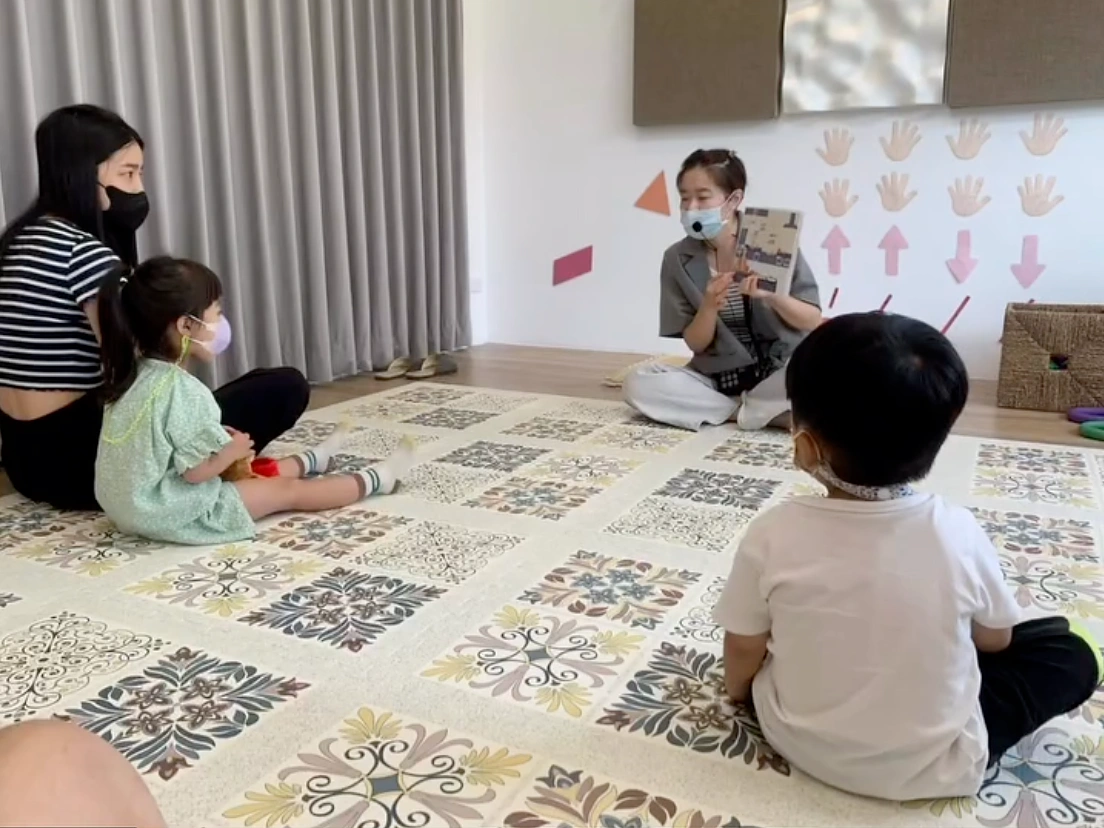
A music lesson has just ended. The teacher is still putting instruments away, and the next child has already arrived. A few new messages have come in on the phone: "My child has never tried percussion. How do we choose a class?" "Do you still have time on Saturday?" One takes listening to a child's interests and experience. The other just takes a look at the schedule. On busy days, though, both land in the same short break between lessons.
Otter Music Studio teaches yangqin and percussion. It brings positive parenting, Orff music and seven-senses play into its lessons to give children a rich, warm place to learn. On a yangqin, you strike the strings with bamboo beaters, and every strike makes a clear note. Percussion can start from things children already know, like clapping and counting beats. Families coming for the first time usually have simple questions: "He loves tapping along to songs. Where should he start?"
Otter Music Studio uses OmceanBooking for online payments, waitlists and class reminders. Parents wait for fewer replies while they arrange pick-ups and drop-offs, and teachers have time to properly answer the questions that need a longer conversation.
Make Every Step of Booking Easier: Booking Through LINE
Once parents have talked with the teacher about their child's interest in yangqin or percussion, the next step is opening the calendar. Can they get there after school on Wednesday? If they switch to Saturday, who can take the child? The studio saying "Yes, there's a spot" is only the first step. By the time the family has sorted things out and comes back to ask about the same slot, someone else may have already booked it.
When available time slots, class times and how to sign up are all on an online booking page, parents can look at the times while checking with their family, then send the booking once everything is settled. Otter Music Studio has turned on LINE Notifications and Online Payment. The studio can put its booking page in the rich menu of its LINE Official Account. When parents open the chat they normally use to contact the studio, the booking link is right there.
After a class is booked, the system can also send class reminders to parents on LINE, depending on the studio's settings. Say Dad is doing pick-up this week. The parent who gets the reminder can forward the time straight to him, so the two of them don't have to dig through their messages separately and end up asking the teacher again. The studio also doesn't have to remind each family one by one, so the few minutes between lessons can go to the child who just walked in.
For classes that need to be paid in advance, parents can pay online, depending on the studio's settings. They don't have to send a screenshot after paying, and the studio can look up payment records. If parents book separate classes for a brother and sister and make two payments on the same day, staff can check the records instead of matching times and amounts in the chat.
Saturday's Music Class Is Full? Parents Can Join the Waitlist
If Saturday morning is the only time a family can make it, seeing that the class is full doesn't mean they can simply switch to another day. Otter Music Studio has turned on the Waitlist feature, so parents can sign up for the class they want, and open spots are filled based on the studio's settings. Parents know they're on the list, so they don't have to keep asking, "Is there a spot yet?" When someone cancels, the studio has a waitlist to check instead of scrolling back through days of messages to find which family said they could come on Saturday.
Class Reminders on Your Phone: Check Once More Before You Leave
Dad is doing pick-up this week, but Mom made the booking. Halfway through Saturday breakfast, they realize they remember class times that are half an hour apart. Otter Music Studio has turned on App Advanced Push Notifications, which can send class reminders to parents who are logged in to the app with notifications on, depending on the studio's settings. Whoever gets the reminder can check the booking time and tell the family member doing pick-up the right time. The studio also sends fewer messages one by one before class, and doesn't have to answer "So what time is it today?" while welcoming children at the door.
Big Brother Wants to Learn Yangqin and Little Sister Wants to Try Percussion. How Do Parents Book Separately?
When brothers and sisters both take music lessons, parents may book for both of them on the same phone. On the studio's side, both bookings show the parent's name, so before preparing for class, the teacher has to ask, "Is the brother or the sister coming to this one?" If the two children are learning different things, that question decides which materials the teacher brings out and where the lesson picks up.
When a studio turns on OmceanBooking's Family Members feature, parents can add their children to their own account and choose who's attending each time they book. Parents can book a class for each child from the same account, and the studio can see from the booking who's coming. If the brother is booked for yangqin and the sister for percussion, the teacher knows while preparing which sheet music or which rhythm exercise to get ready next.
The Music Class Album Holds Stories Your Child Wants to Tell You at Home
Parents ask, "How was class today?" and sometimes all they get is "Fine." The child may not even notice it themselves. A few weeks ago they had to watch the teacher count the beats, and today they came in right on their turn.
If a music studio wants to keep these moments, it can organize photos into albums or class photo walls for each event. Photos from a showcase that are fine to share publicly, for example, can go into a themed album. If only the students in a particular class should be able to see the photos, the studio can use a Class Photo Wall, and check with parents before taking and sharing photos.
If all the photos stay on the teacher's phone, a parent who asks for them a few days later means the teacher has to scroll through the camera roll, work out which class it was, and send them separately. When photos are organized by class or event, the studio has a set place to keep them, and the people who can view them have an easier time finding that day's pictures.
You don't need photos of every lesson. Now and then, a picture of a child picking up bamboo beaters for the first time, or taking turns tapping out a rhythm with classmates, gives you plenty to talk about. For family members who weren't at the studio that day, the photos are also a chance to hear the child tell them what happened.
Music Studio Booking System FAQ
Can a music studio offer bookings for both one-on-one instrument lessons and group classes?
Yes. Take one-on-one yangqin lessons and group percussion classes for children as an example: the studio can set them up as separate classes. Parents book one-on-one lessons in the time slots the teacher makes available, while group classes take sign-ups based on the class schedule and the number of spots in each class. Parents can check which times work for pick-up and drop-off first, and the studio can keep track of each teacher's schedule and how many children are in each class.
What can a music studio do about make-up lessons when a child has to miss class at short notice?
The studio can first set the latest time parents can cancel on their own, and what happens after that deadline. For example, if a child has a school event, parents who cancel the original class before the deadline can book again based on the studio's make-up rules and available time slots. If the deadline has passed, parents can contact the studio to ask whether a make-up lesson is possible. When the rules are written down in advance, parents know where to go, and teachers handle last-minute absences the same way every time.
Can a music studio sell an 8-lesson package that parents book one lesson at a time?
Yes. The studio can set the price, validity period and eligible classes for an 8-lesson package. After buying the class pass, parents can book one lesson at a time and see how many lessons are left. When the school calendar changes or the times they can do pick-up vary from week to week, parents can check the available time slots and plan around them. The studio also no longer has to work out remaining lessons by hand for each family.
Do parents have to download the app to book classes for their children?
No. Parents can book through the web link the studio provides. If the studio has connected its LINE Official Account, the booking link can also go in the rich menu. To get class reminders through the app, parents need to download it, log in and turn on notifications.
Less Back-and-Forth Over Bookings Means Teachers Can Focus on Music
Checking time slots for parents, confirming lesson fees, reminding families what time class is tomorrow: each task may take only a few minutes, but they often all pile up between two lessons. When parents can check time slots themselves and payment records are kept in one place, class reminders can be left to OmceanBooking. Teachers have fewer things to squeeze into the break between lessons, and can focus on preparing for the next one.
With those extra few minutes, a teacher can look at where a child got stuck last time. When parents come for pick-up, there's time to say, "At home, just practice these two bars slowly." For the child, the next lesson picks up right where the last one left off. For the teacher, there are fewer messages to catch up on after the day's last class.
If you also run a music studio, bring the one thing that most often interrupts your lesson prep and let's talk. Whether parents need several rounds of messages to book a class, or you have to remind every family about every lesson, we can look together at which steps the system can handle so teachers can spend their time teaching.
Book a consultation now | Try OmceanBooking for free
At Otter Music Studio, It Starts With the Sound Your Child Is Curious About
When a favorite song comes on, a child's hands start tapping on the table. That's what makes percussion fun. Clap a little, tap a little, and children can join in the music in their own way. When they pick up the bamboo beaters, they find out that striking can make a melody too.
Otter Music Studio teaches yangqin and percussion and brings positive parenting, Orff music and seven-senses play into the classroom. Children can first listen to different sounds, then try answering a rhythm with their hands and bodies. Some want to move as soon as they hear it, and others like to watch for a while first. Either way, they can start at their own pace.
If you'd like to help your child step into the world of music, come and meet Otter. Start with the sound they want to try, and make their first music lesson something they look forward to.
Meet Otter Music Studio and ask about yangqin and percussion classes →
Was this article helpful?
